


Page 66 - CC 2019 ID Look Inside
P. 66
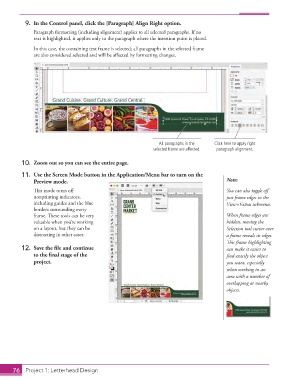
9.  In the Control panel, click the [Paragraph] Align Right option.
                   Paragraph formatting (including alignment) applies to all selected paragraphs. If no
                   text is highlighted, it applies only to the paragraph where the insertion point is placed.
                   In this case, the containing text frame is selected; all paragraphs in the selected frame
                   are also considered selected and will be affected by formatting changes.


                                                                   All paragraphs in the   Click here to apply right
                                                                 selected frame are affected.  paragraph alignment.

               10.  Zoom out so you can see the entire page.

               11.  Use the Screen Mode button in the Application/Menu bar to turn on the
                   Preview mode.                                                             Note:
                   This mode turns off                                                       You can also toggle off
                   nonprinting indicators,                                                   just frame edges in the
                   including guides and the blue                                             View>Extras submenu.
                   borders surrounding every
                   frame. These tools can be very                                            When frame edges are
                   valuable when you’re working                                              hidden, moving the
                   on a layout, but they can be                                              Selection tool cursor over
                   distracting in other cases.                                               a frame reveals its edges.
                                                                                             This frame highlighting
               12.  Save the file and continue                                               can make it easier to
                   to the final stage of the                                                 find exactly the object
                   project.                                                                  you want, especially
                                                                                             when working in an
                                                                                             area with a number of
                                                                                             overlapping or nearby
                                                                                             objects.


           76   Project 1: Letterhead Design

