


Page 42 - CC2018_ID_Look_Inside
P. 42
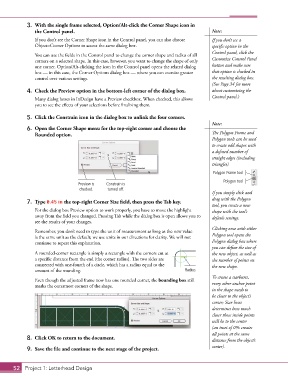
3.  With the single frame selected, Option/Alt-click the Corner Shape icon in
               the Control panel.                                                       Note:

               If you don’t see the Corner Shape icon in the Control panel, you can also choose   If you don’t see a
               Object>Corner Options to access the same dialog box.                     specific option in the
                                                                                        Control panel, click the
               You can use the fields in the Control panel to change the corner shape and radius of all
               corners on a selected shape. In this case, however, you want to change the shape of only   Customize Control Panel
               one corner. Option/Alt-clicking the icon in the Control panel opens the related dialog   button and make sure
               box — in this case, the Corner Options dialog box — where you can exercise greater   that option is checked in
               control over various settings.                                           the resulting dialog box.
                                                                                        (See Page 34 for more
            4.  Check the Preview option in the bottom-left corner of the dialog box.   about customizing the
                                                                                        Control panel.)
               Many dialog boxes in InDesign have a Preview checkbox. When checked, this allows
               you to see the effects of your selections before finalizing them.

            5.  Click the Constrain icon in the dialog box to unlink the four corners.
                                                                                        Note:
            6.  Open the Corner Shape menu for the top-right corner and choose the
               Rounded option.                                                          The Polygon Frame and
                                                                                        Polygon tools can be used
                                                                                        to create odd shapes with
                                                                                        a defined number of
                                                                                        straight edges (including
                                                                                        triangles).
                                                                                         Polygon Frame tool
                                                                                             Polygon tool
                                 Preview is   Constrain is
                                  checked.   turned off.
                                                                                        If you simply click and
                                                                                        drag with the Polygon
            7.  Type 0.45 in the top-right Corner Size field, then press the Tab key.
                                                                                        tool, you create a new
               For the dialog box Preview option to work properly, you have to move the highlight   shape with the tool’s
               away from the field you changed. Pressing Tab while the dialog box is open allows you to   default settings.
               see the results of your changes.
                                                                                        Clicking once with either
               Remember, you don’t need to type the unit of measurement as long as the new value
               is the same unit as the default; we use units in our directions for clarity. We will not   Polygon tool opens the
               continue to repeat this explanation.                                     Polygon dialog box where
                                                                                        you can define the size of
               A rounded-corner rectangle is simply a rectangle with the corners cut at    the new object, as well as
               a specific distance from the end (the corner radius). The two sides are   the number of points on
               connected with one-fourth of a circle, which has a radius equal to the   the new shape.
               amount of the rounding.                                       Radius
                                                                                        To create a starburst,
               Even though the adjusted frame now has one rounded corner, the bounding box still
               marks the outermost corners of the shape.                                every other anchor point
                                                                                        in the shape needs to
                                                                                        be closer to the object’s
                                                                                        center; Star Inset
                                                                                        determines how much
                                                                                        closer those inside points
                                                                                        will be to the center
                                                                                        (an inset of 0% creates
                                                                                        all points at the same
            8.  Click OK to return to the document.                                     distance from the object’s

            9.  Save the file and continue to the next stage of the project.            center).


       52 Project 1: Letterhead Design

