


Page 39 - CC2018_ID_Look_Inside
P. 39
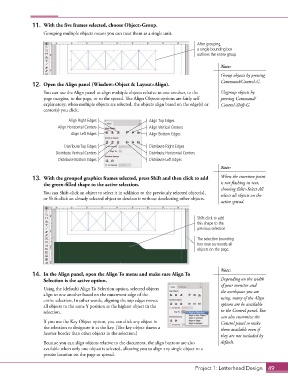
11.  With the five frames selected, choose Object>Group.
                   Grouping multiple objects means you can treat them as a single unit.

                                                                                  After grouping,
                                                                                  a single bounding box
                                                                                  outlines the entire group.

                                                                                            Note:

                                                                                            Group objects by pressing
                                                                                            Command/Control-G.
               12.  Open the Align panel (Window>Object & Layout>Align).
                   You can use the Align panel to align multiple objects relative to one another, to the   Ungroup objects by
                   page margins, to the page, or to the spread. The Align Objects options are fairly self   pressing Command/
                   explanatory; when multiple objects are selected, the objects align based on the edge(s) or   Control-Shift-G.
                   center(s) you click.
                             Align Right Edges                 Align Top Edges
                         Align Horizontal Centers              Align Vertical Centers
                              Align Left Edges                 Align Bottom Edges

                            Distribute Top Edges               Distribute Right Edges
                        Distribute Vertical Centers            Distribute Horizontal Centers
                         Distribute Bottom Edges               Distribute Left Edges
                                                                                            Note:

               13.  With the grouped graphics frames selected, press Shift and then click to add   When the insertion point
                   the green-filled shape to the active selection.                          is not flashing in text,
                                                                                            choosing Edit>Select All
                   You can Shift-click an object to select it in addition to the previously selected object(s),    selects all objects on the
                   or Shift-click an already selected object to deselect it without deselecting other objects.
                                                                                            active spread.


                                                                                  Shift-click to add
                                                                                  this shape to the
                                                                                  previous selection.

                                                                                  The selection bounding
                                                                                  box now surrounds all
                                                                                  objects on the page.


                                                                                            Note:
               14.  In the Align panel, open the Align To menu and make sure Align To
                   Selection is the active option.                                          Depending on the width
                                                                                            of your monitor and
                   Using the (default) Align To Selection option, selected objects          the workspace you are
                   align to one another based on the outermost edge of the
                   entire selection. In other words, aligning the top edges moves           using, many of the Align
                   all objects to the same Y position as the highest object in the          options are be available
                   selection.                                                               in the Control panel. You
                                                                                            can also customize the
                   If you use the Key Object option, you can click any object in            Control panel to make
                   the selection to designate it as the key. (The key object shows a        them available even if
                   heavier border than other objects in the selection.)
                                                                                            they are not included by
                   Because you can align objects relative to the document, the align buttons are also   default.
                   available when only one object is selected, allowing you to align any single object to a
                   precise location on the page or spread.


                                                                                  Project 1: Letterhead Design  49

