


Page 40 - CC2018_ID_Look_Inside
P. 40
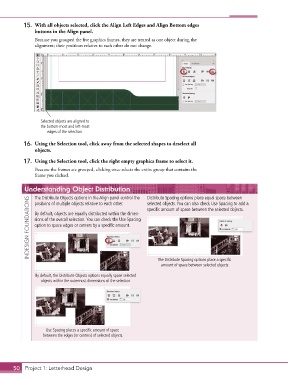
15.  With all objects selected, click the Align Left Edges and Align Bottom edges
               buttons in the Align panel.

               Because you grouped the five graphics frames, they are treated as one object during the
               alignment; their positions relative to each other do not change.


                  Selected objects are aligned to
                  the bottom-most and left-most
                     edges of the selection.

           16.  Using the Selection tool, click away from the selected shapes to deselect all
               objects.

           17.  Using the Selection tool, click the right empty graphics frame to select it.
               Because the frames are grouped, clicking once selects the entire group that contains the
               frame you clicked.


           Understanding Object Distribution                  Distribute Spacing options place equal space between
               The Distribute Objects options in the Align panel control the
             INDESIGN FOUNDATIONS  By default, objects are equally distributed within the dimen-  specific amount of space between the selected objects.
               positions of multiple objects relative to each other.
                                                              selected objects. You can also check Use Spacing to add a

               sions of the overall selection. You can check the Use Spacing
               option to space edges or centers by a specific amount.


                                                                  The Distribute Spacing options place a specific
                                                                   amount of space between selected objects.
                By default, the Distribute Objects options equally space selected
                  objects within the outermost dimensions of the selection.


                    Use Spacing places a specific amount of space
                   between the edges (or centers) of selected objects.


       50 Project 1: Letterhead Design

