


Page 19 - CC2018_ID_Look_Inside
P. 19
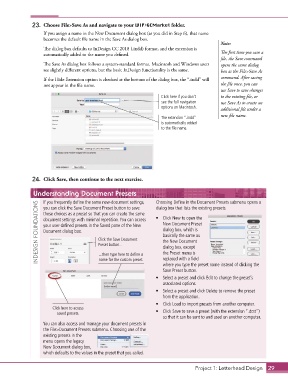
23.  Choose File>Save As and navigate to your WIP>GCMarket folder.
                   If you assign a name in the New Document dialog box (as you did in Step 6), that name
                   becomes the default file name in the Save As dialog box.
                                                                                            Note:
                   The dialog box defaults to InDesign CC 2018 (.indd) format, and the extension is
                   automatically added to the name you defined.                             The first time you save a
                                                                                            file, the Save command
                   The Save As dialog box follows a system-standard format. Macintosh and Windows users   opens the same dialog
                   see slightly different options, but the basic InDesign functionality is the same.  box as the File>Save As

                   If the Hide Extension option is checked at the bottom of the dialog box, the “.indd” will   command. After saving
                   not appear in the file name.                                             the file once, you can
                                                                                            use Save to save changes
                                                                    Click here if you don’t   to the existing file, or
                                                                    see the full navigation   use Save As to create an
                                                                    options on Macintosh.   additional file under a
                                                                                            new file name.
                                                                    The extension “.indd”
                                                                    is automatically added
                                                                    to the file name.


               24.  Click Save, then continue to the next exercise.


               Understanding Document Presets                    Choosing Define in the Document Presets submenu opens a
                   If you frequently define the same new-document settings,
                 INDESIGN FOUNDATIONS  those choices as a preset so that you can create the same   •  Click New to open the
                                                                 dialog box that lists the existing presets.
                   you can click the Save Document Preset button to save
                   document settings with minimal repetition. You can access
                                                                    New Document Preset
                   your user-defined presets in the Saved pane of the New
                                                                    dialog box, which is
                   Document dialog box.
                                                                    basically the same as
                                          Click the Save Document
                                                                    the New Document
                                          Preset button...
                                                                    dialog box, except
                                                                    the Preset menu is
                                          ...then type here to define a
                                                                    replaced with a field
                                          name for the custom preset.
                                                                    where you type the preset name instead of clicking the
                                                                    Save Preset button.
                                                                 •  Select a preset and click Edit to change the preset’s
                                                                    associated options.
                                                                 •  Select a preset and click Delete to remove the preset
                                                                    from the application.
                                                                 •  Click Load to import presets from another computer.
                       Click here to access
                         saved presets.                          •  Click Save to save a preset (with the extension “.dcst”)
                                                                    so that it can be sent to and used on another computer.
                   You can also access and manage your document presets in
                   the File>Document Presets submenu. Choosing one of the
                   existing presets in the
                   menu opens the legacy
                   New Document dialog box,
                   which defaults to the values in the preset that you called.


                                                                                  Project 1: Letterhead Design  29

