


Page 38 - CC2018_WD_Look_Inside
P. 38
Working with Embedded and Linked Smart Objects
               In the previous exercise you used the Place Embedded
                                                              Linked files also have potential disadvantages. As we
             PHOTOSHOP FOUNDATIONS  becomes a part of the parent file.  an application that can edit the relevant data. If you are
                                                              mentioned previously, double-clicking a Smart Object
               option to create Smart Object layers that contain the
                                                              layer thumbnail opens the linked or embedded file in
               placed file data. Using that method the embedded file data
                                                              working with linked Smart Object layers, any changes you
               If you double-click the thumbnail icon of an embedded
                                                              make affect the original file data. This means your changes
               Smart Object, the embedded file opens in an application
                                                              appear not only in the parent Photoshop file where it is
               that can edit the stored data — .AI files open in Illustrator;
                                                              linked, but also any other file that links to the same data.
               PSD, TIFF, and JPEG files open in Photoshop.
                                                              For a file to output properly, linked Smart Object layers must
               When you first open a Smart Object file, the application
                                                              be present and up-to-date at the time of output.
               provides advice for working with Smart Objects:
                                                              If the linked file has been modified while the parent file is
                                                              open, the changes automatically reflect in the parent file
                                                              when you return to that document. If the parent file is not
                                                              open in Photoshop when the linked file is edited, you will
                                                              see a Modified icon for the linked Smart Object layer.
                                                              If the linked file is deleted or moved to another location
               After you make necessary changes, you can save the file   after it has been placed, the parent file will show a Missing
               and close it, then return to Photoshop (if necessary). Your   icon for the linked Smart Object layer.
               changes in the Smart Object file will automatically reflect in
               the parent file where the Smart Object layer is placed.  If a linked Smart Object has been moved while the parent
                                                              file is not open, you will see a warning dialog box when you
               Important note: Do not use the Save As option when   open the parent Photoshop file. You can use that dialog box
               editing Smart Object layers. The changes will not reflect in   to locate the missing link, or close it and use the options in
               the parent file if you save changes with a different file name.  the Layers panel to correct the problem.

               If you choose the Place Linked option in the File menu,   Control/right-clicking a linked Smart Object layer name
               Smart Object layer stores a link to the original file data   opens a contextual menu with options to update modified
               rather than embedding that data inside the parent file.   content and resolve broken links.
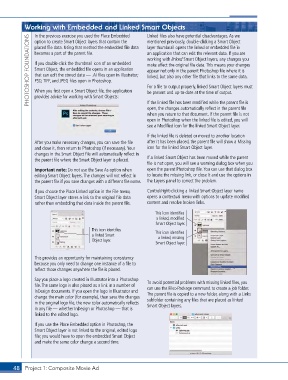
                                                                 This icon identifies
                                                                 a linked, modified
                                                                 Smart Object layer.
                                       This icon identifies      This icon identifies
                                       a linked Smart             a linked, missing
                                       Object layer.
                                                                 Smart Object layer.


               This provides an opportunity for maintaining consistency
               because you only need to change one instance of a file to
               reflect those changes anywhere the file is placed.
               Say you place a logo created in Illustrator into a Photoshop   To avoid potential problems with missing linked files, you
               file. The same logo is also placed as a link in a number of   can use the File>Package command to create a job folder.
               InDesign documents. If you open the logo in Illustrator and   The parent file is copied to a new folder, along with a Links
               change the main color (for example), then save the changes   subfolder containing any files that are placed as linked
               in the original logo file, the new color automatically reflects   Smart Object layers.
               in any file — whether InDesign or Photoshop — that is
               linked to the edited logo.

               If you use the Place Embedded option in Photoshop, the
               Smart Object layer is not linked to the original, edited logo
               file; you would have to open the embedded Smart Object
               and make the same color change a second time.


       48 Project 1: Composite Movie Ad

