


Page 52 - CC2017_WD_Look_Inside
P. 52
edit A veCtor pAth
          In most cases, the first path you draw won’t be perfect; you’ll probably need to edit at
          least one or two points or segments, move existing points, or even add or delete points
          before your path exactly matches the shape you’re outlining. As you complete this
          exercise, we show you how to correct the path in our screen shots. You should follow
          the general directions to correct the path that you drew in the previous exercise.

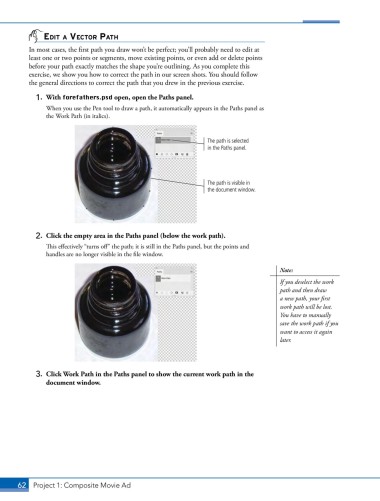
            1.  With forefathers.psd open, open the Paths panel.
               When you use the Pen tool to draw a path, it automatically appears in the Paths panel as
               the Work Path (in italics).


                                                                  The path is selected
                                                                  in the Paths panel.


                                                                  The path is visible in
                                                                  the document window.


            2.  Click the empty area in the Paths panel (below the work path).
               This effectively “turns off” the path; it is still in the Paths panel, but the points and
               handles are no longer visible in the file window.

                                                                                        Note:
                                                                                        If you deselect the work
                                                                                        path and then draw
                                                                                        a new path, your first
                                                                                        work path will be lost.
                                                                                        You have to manually
                                                                                        save the work path if you
                                                                                        want to access it again
                                                                                        later.


            3.  Click Work Path in the Paths panel to show the current work path in the
               document window.


       62 Project 1: Composite Movie Ad

