


Page 38 - CC2017_WD_Look_Inside
P. 38
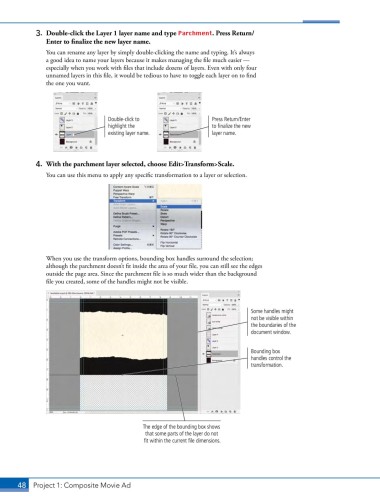
3.  Double-click the Layer 1 layer name and type Parchment. Press Return/
               Enter to finalize the new layer name.

               You can rename any layer by simply double-clicking the name and typing. It’s always
               a good idea to name your layers because it makes managing the file much easier —
               especially when you work with files that include dozens of layers. Even with only four
               unnamed layers in this file, it would be tedious to have to toggle each layer on to find
               the one you want.


                                   Double-click to                 Press Return/Enter
                                   highlight the                   to finalize the new
                                   existing layer name.            layer name.


            4.  With the parchment layer selected, choose Edit>Transform>Scale.
               You can use this menu to apply any specific transformation to a layer or selection.


               When you use the transform options, bounding box handles surround the selection;
               although the parchment doesn’t fit inside the area of your file, you can still see the edges
               outside the page area. Since the parchment file is so much wider than the background
               file you created, some of the handles might not be visible.


                                                                               Some handles might
                                                                               not be visible within
                                                                               the boundaries of the
                                                                               document window.


                                                                               Bounding box
                                                                               handles control the
                                                                               transformation.


                                              The edge of the bounding box shows
                                              that some parts of the layer do not
                                              fit within the current file dimensions.


       48 Project 1: Composite Movie Ad

