


Page 43 - CC2017_WD_Look_Inside
P. 43
mAke And refine A QuiCk seleCtion
              Rather than drawing a selection area, you can make selections based on the color in an
              image. This technique is especially useful when you want to select large areas of solid
              color, or in photos with significant contrast between the foreground and background.

                1.  With forefathers.psd open, zoom in so you can clearly see the Parchment
                   layer content.
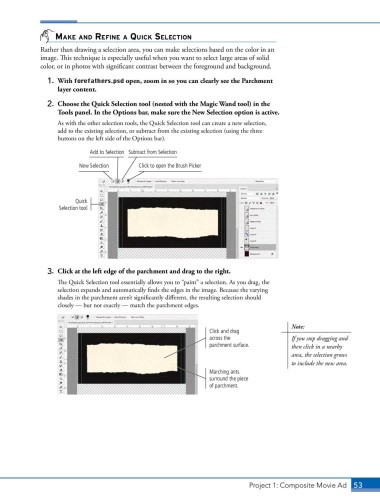
                2.  Choose the Quick Selection tool (nested with the Magic Wand tool) in the
                   Tools panel. In the Options bar, make sure the New Selection option is active.
                   As with the other selection tools, the Quick Selection tool can create a new selection,
                   add to the existing selection, or subtract from the existing selection (using the three
                   buttons on the left side of the Options bar).

                             Add to Selection  Subtract from Selection

                          New Selection     Click to open the Brush Picker


                         Quick
                   Selection tool


                3.  Click at the left edge of the parchment and drag to the right.
                   The Quick Selection tool essentially allows you to “paint” a selection. As you drag, the
                   selection expands and automatically finds the edges in the image. Because the varying
                   shades in the parchment aren’t significantly different, the resulting selection should
                   closely — but not exactly — match the parchment edges.


                                                                                            Note:
                                                                  Click and drag
                                                                  across the                If you stop dragging and
                                                                  parchment surface.        then click in a nearby
                                                                                            area, the selection grows
                                                                                            to include the new area.
                                                                  Marching ants
                                                                  surround the piece
                                                                  of parchment.


                                                                               Project 1: Composite Movie Ad    53

