


Page 33 - CC2017_WD_Look_Inside
P. 33
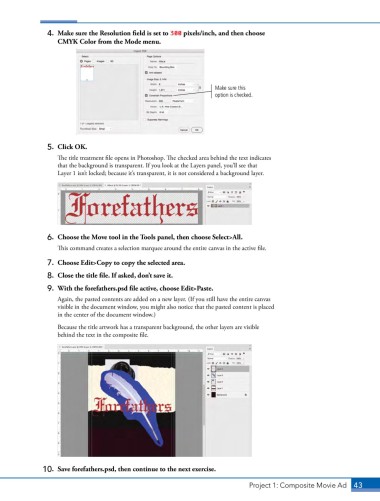
4.  Make sure the Resolution field is set to 300 pixels/inch, and then choose
                   CMYK Color from the Mode menu.


                                                                    Make sure this
                                                                    option is checked.


                5.  Click OK.
                   The title treatment file opens in Photoshop. The checked area behind the text indicates
                   that the background is transparent. If you look at the Layers panel, you’ll see that
                   Layer 1 isn’t locked; because it’s transparent, it is not considered a background layer.


                6.  Choose the Move tool in the Tools panel, then choose Select>All.
                   This command creates a selection marquee around the entire canvas in the active file.
                7.  Choose Edit>Copy to copy the selected area.

                8.  Close the title file. If asked, don’t save it.

                9.  With the forefathers.psd file active, choose Edit>Paste.
                   Again, the pasted contents are added on a new layer. (If you still have the entire canvas
                   visible in the document window, you might also notice that the pasted content is placed
                   in the center of the document window.)
                   Because the title artwork has a transparent background, the other layers are visible
                   behind the text in the composite file.


               10.  Save forefathers.psd, then continue to the next exercise.

                                                                               Project 1: Composite Movie Ad    43

