


Page 54 - Adobe Photoshop and Dreamviewer 2021
P. 54
3.  Close the Lightning.jpg file.
               Your goal in this exercise is to create a transparent area around the actual lightning bolt.   Note:

               Flat files (including JPEG) do not support transparency. To save the file with   If the original placed file
               transparency, you should save it as a native Photoshop file with the PSD extension.   was a native Photoshop
               However, as the warning message indicated, you must save the Smart Object file with   file, you would not need
               the same name — which includes the file extension.                       to rasterize the Smart
                                                                                        Object layer to accom-
               Because you can’t save transparency in a JPEG file, you need to break the link to the
               original JPEG file before you can create that transparency in the composite file.  plish your goal.

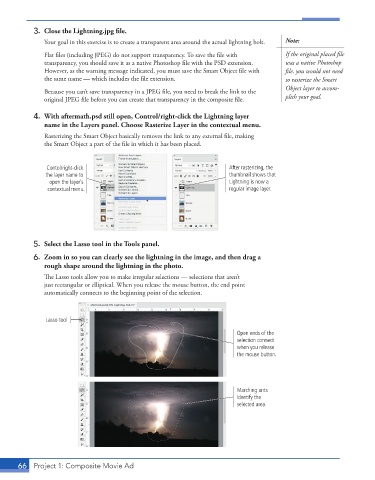
           4.  With aftermath.psd still open, Control/right-click the Lightning layer
              name in the Layers panel. Choose Rasterize Layer in the contextual menu.
               Rasterizing the Smart Object basically removes the link to any external file, making
               the Smart Object a part of the file in which it has been placed.


               Contol/right-click                                      After rasterizing, the
               the layer name to                                       thumbnail shows that
                open the layer’s                                       Lightning is now a
                contextual menu.                                       regular image layer.


           5.  Select the Lasso tool in the Tools panel.
           6.  Zoom in so you can clearly see the lightning in the image, and then drag a
              rough shape around the lightning in the photo.
               The Lasso tools allow you to make irregular selections — selections that aren’t
               just rectangular or elliptical. When you release the mouse button, the end point
               automatically connects to the beginning point of the selection.


               Lasso tool

                                                                         Open ends of the
                                                                         selection connect
                                                                         when you release
                                                                         the mouse button.


                                                                         Marching ants
                                                                         identify the
                                                                         selected area.


       66  Project 1: Composite Movie Ad

