


Page 53 - Adobe Photoshop and Dreamviewer 2021
P. 53
STAGE 3 / Creating Complex Selections

            At this stage of the project, you still have a few issues to resolve: some of the images are still
            randomly stacked on top of one another, and some have areas that are hiding other images (the blue
            sky in the Skyline layer, for example). In this stage, you start fixing these problems.
               Virtually any Photoshop project involves making some kind of selection. Making selections is so
            important, in fact, that there are no fewer than nine tools dedicated specifically to this goal, as well
            as a whole Select menu, and a few other options for making and refining selections.
               In an earlier lesson you learned how to use the Rectangular Marquee tool to draw simple
            selections. In the next series of exercises, you use several other selection methods to isolate pixels
            from their backgrounds, called silhouetting.


                  Make a Feathered Selection in a Smart Object
            Smart Object layers are actually links to the files that are placed. If you open the
            linked file and make changes, those changes are automatically reflected in the file
            in which the Smart Object layer exists. In this exercise, you will explore one of the
            advantages and disadvantages of Smart Object layers.

              1.  With aftermath.psd open, hide all but the Lightning layer.

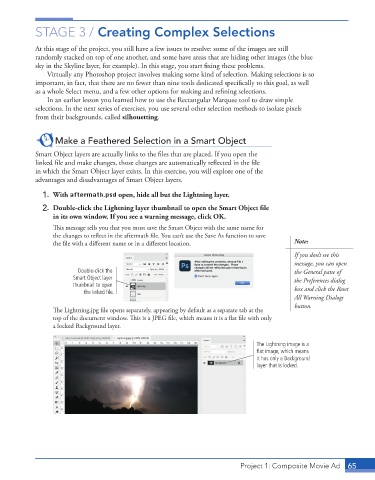
              2.  Double-click the Lightning layer thumbnail to open the Smart Object file
                 in its own window. If you see a warning message, click OK.

                 This message tells you that you must save the Smart Object with the same name for
                 the changes to reflect in the aftermath file. You can’t use the Save As function to save
                 the file with a different name or in a different location.                Note:
                                                                                           If you don’t see this
                                                                                           message, you can open
                         Double-click the                                                  the General pane of
                       Smart Object layer                                                  the Preferences dialog
                       thumbnail to open                                                   box and click the Reset
                           the linked file.
                                                                                           All Warning Dialogs
                                                                                           button.
                 The Lightning.jpg file opens separately, appearing by default as a separate tab at the
                 top of the document window. This is a JPEG file, which means it is a flat file with only
                 a locked Background layer.


                                                                               The Lightning image is a
                                                                               flat image, which means
                                                                               it has only a Background
                                                                               layer that is locked.


                                                                          Project 1: Composite Movie Ad    65

