


Page 52 - Adobe Photoshop and Dreamviewer 2021
P. 52
Navigating the Photoshop File History

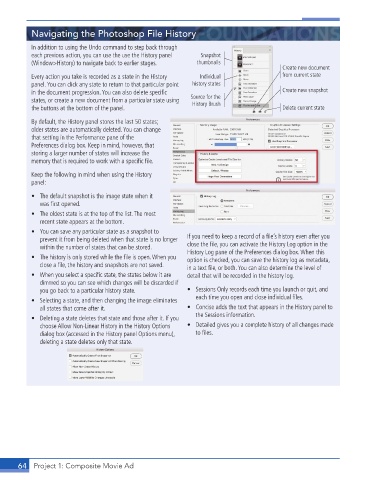
           In addition to using the Undo command to step back through
           each previous action, you can use the use the History panel   Snapshot
           (Window>History) to navigate back to earlier stages.  thumbnails
                                                                                       Create new document
           Every action you take is recorded as a state in the History   Individual    from current state
           panel. You can click any state to return to that particular point   history states
           in the document progression. You can also delete specifi c                   Create new snapshot
           states, or create a new document from a particular state using   Source for the
                                                            History Brush
           the buttons at the bottom of the panel.                                     Delete current state
           By default, the History panel stores the last 50 states;
           older states are automatically deleted. You can change
           that setting in the Performance pane of the
           Preferences dialog box. Keep in mind, however, that
           storing a larger number of states will increase the
           memory that is required to work with a specifi c fi le.
           Keep the following in mind when using the History
           panel:

           •  The default snapshot is the image state when it
             was fi rst opened.
           •  The oldest state is at the top of the list. The most
             recent state appears at the bottom.
           •  You can save any particular state as a snapshot to
             prevent it from being deleted when that state is no longer   If you need to keep a record of a fi le’s history even after you
             within the number of states that can be stored.  close the fi le, you can activate the History Log option in the
                                                          History Log pane of the Preferences dialog box. When this
           •  The history is only stored while the fi le is open. When you   option is checked, you can save the history log as metadata,
             close a fi le, the history and snapshots are not saved.   in a text fi le, or both. You can also determine the level of
           •  When you select a specifi c state, the states below it are   detail that will be recorded in the history log.
             dimmed so you can see which changes will be discarded if
             you go back to a particular history state.   •  Sessions Only records each time you launch or quit, and
                                                             each time you open and close individual fi les.
           •  Selecting a state, and then changing the image eliminates
             all states that come after it.               •  Concise adds the text that appears in the History panel to
                                                             the Sessions information.
           •  Deleting a state deletes that state and those after it. If you
             choose Allow Non-Linear History in the History Options   •  Detailed gives you a complete history of all changes made
             dialog box (accessed in the History panel Options menu),   to fi les.
             deleting a state deletes only that state.


       64  Project 1: Composite Movie Ad

