


Page 20 - Adobe Photoshop and Dreamviewer 2021
P. 20
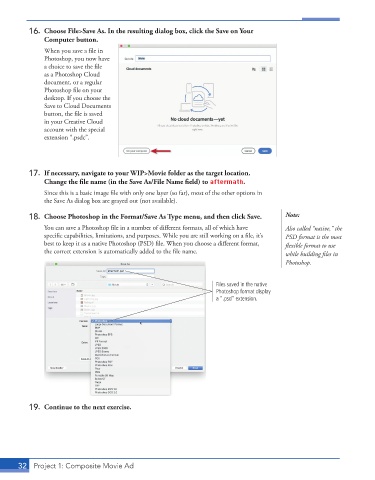
16.  Choose File>Save As. In the resulting dialog box, click the Save on Your
              Computer button.
               When you save a file in

               Photoshop, you now have
               a choice to save the file

               as a Photoshop Cloud
               document, or a regular

               Photoshop file on your
               desktop. If you choose the
               Save to Cloud Documents
               button, the file is saved

               in your Creative Cloud
               account with the special
               extension “.psdc”.


          17.  If necessary, navigate to your WIP>Movie folder as the target location.

              Change the file name (in the Save As/File Name field) to aftermath.


               Since this is a basic image file with only one layer (so far), most of the other options in
               the Save As dialog box are grayed out (not available).
          18.  Choose Photoshop in the Format/Save As Type menu, and then click Save.   Note:


               You can save a Photoshop file in a number of different formats, all of which have   Also called “native,” the
               specific capabilities, limitations, and purposes. While you are still working on a file, it’s   PSD format is the most


               best to keep it as a native Photoshop (PSD) file. When you choose a different format,   fl exible format to use

               the correct extension is automatically added to the file name.           while building files in

                                                                                        Photoshop.
                                                                   Files saved in the native
                                                                   Photoshop format display
                                                                   a “.psd” extension.


          19.  Continue to the next exercise.


       32  Project 1: Composite Movie Ad

