


Page 18 - Adobe Photoshop and Dreamviewer 2021
P. 18
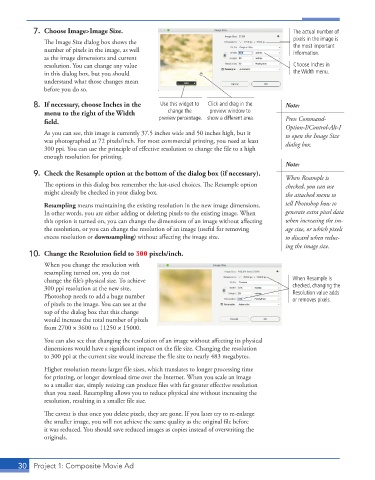
7.  Choose Image>Image Size.                                                    The actual number of
               The Image Size dialog box shows the                                         pixels in the image is
               number of pixels in the image, as well                                      the most important
                                                                                           information.
               as the image dimensions and current
               resolution. You can change any value                                        Choose Inches in
               in this dialog box, but you should                                          the Width menu.
               understand what those changes mean
               before you do so.

           8.  If necessary, choose Inches in the   Use this widget to   Click and drag in the   Note:
              menu to the right of the Width        change the   preview window to
              field.                              preview percentage. show a different area.  Press Command-
                                                                                        Option-I/Control-Alt-I
               As you can see, this image is currently 37.5 inches wide and 50 inches high, but it   to open the Image Size
               was photographed at 72 pixels/inch. For most commercial printing, you need at least   dialog box.
               300 ppi. You can use the principle of effective resolution to change the file to a high
               enough resolution for printing.
                                                                                        Note:
           9.  Check the Resample option at the bottom of the dialog box (if necessary).
                                                                                        When Resample is
               The options in this dialog box remember the last-used choices. The Resample option   checked, you can use
               might already be checked in your dialog box.                             the attached menu to
               Resampling means maintaining the existing resolution in the new image dimensions.   tell Photoshop how to
               In other words, you are either adding or deleting pixels to the existing image. When   generate extra pixel data
               this option is turned on, you can change the dimensions of an image without affecting   when increasing the im-
               the resolution, or you can change the resolution of an image (useful for removing   age size, or which pixels
               excess resolution or downsampling) without affecting the image size.     to discard when reduc-
                                                                                        ing the image size.
          10.  Change the Resolution field to 300 pixels/inch.
               When you change the resolution with
               resampling turned on, you do not
               change the file’s physical size. To achieve                                When Resample is
               300 ppi resolution at the new size,                                        checked, changing the
               Photoshop needs to add a huge number                                       Resolution value adds
                                                                                          or removes pixels.
               of pixels to the image. You can see at the
               top of the dialog box that this change
               would increase the total number of pixels
               from 2700 1 3600 to 11250 1 15000.
               You can also see that changing the resolution of an image without affecting its physical
               dimensions would have a significant impact on the file size. Changing the resolution
               to 300 ppi at the current size would increase the file size to nearly 483 megabytes.

               Higher resolution means larger file sizes, which translates to longer processing time
               for printing, or longer download time over the Internet. When you scale an image
               to a smaller size, simply resizing can produce files with far greater effective resolution
               than you need. Resampling allows you to reduce physical size without increasing the
               resolution, resulting in a smaller file size.
               The caveat is that once you delete pixels, they are gone. If you later try to re-enlarge
               the smaller image, you will not achieve the same quality as the original file before
               it was reduced. You should save reduced images as copies instead of overwriting the
               originals.


       30  Project 1: Composite Movie Ad

