


Page 17 - Adobe Photoshop and Dreamviewer 2021
P. 17
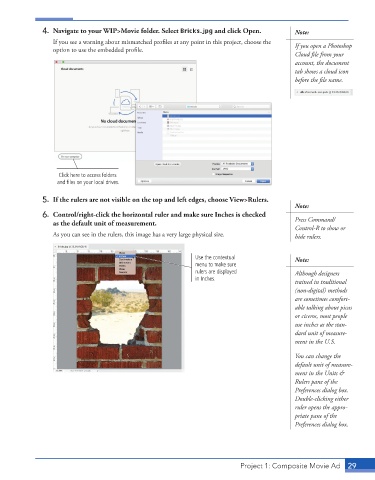
4.  Navigate to your WIP>Movie folder. Select Bricks.jpg and click Open.      Note:
                 If you see a warning about mismatched profiles at any point in this project, choose the   If you open a Photoshop

                 option to use the embedded profile.


                                                                                           Cloud file from your
                                                                                           account, the document
                                                                                           tab shows a cloud icon

                                                                                           before the file name.


                   Click here to access folders
                   and files on your local drives.

             5.  If the rulers are not visible on the top and left edges, choose View>Rulers.
                                                                                           Note:
             6.  Control/right-click the horizontal ruler and make sure Inches is checked
                 as the default unit of measurement.                                       Press Command/
                                                                                           Control-R to show or
                 As you can see in the rulers, this image has a very large physical size.   hide rulers.


                                                             Use the contextual            Note:
                                                             menu to make sure
                                                             rulers are displayed          Although designers
                                                             in Inches.
                                                                                           trained in traditional
                                                                                           (non-digital) methods
                                                                                           are sometimes comfort-
                                                                                           able talking about picas
                                                                                           or ciceros, most people
                                                                                           use inches as the stan-
                                                                                           dard unit of measure-
                                                                                           ment in the U.S.

                                                                                           You can change the
                                                                                           default unit of measure-
                                                                                           ment in the Units &
                                                                                           Rulers pane of the
                                                                                           Preferences dialog box.
                                                                                           Double-clicking either
                                                                                           ruler opens the appro-
                                                                                           priate pane of the
                                                                                           Preferences dialog box.


                                                                          Project 1: Composite Movie Ad    29

