


Page 21 - Adobe Photoshop and Dreamviewer 2021
P. 21
Understanding File Saving Preferences

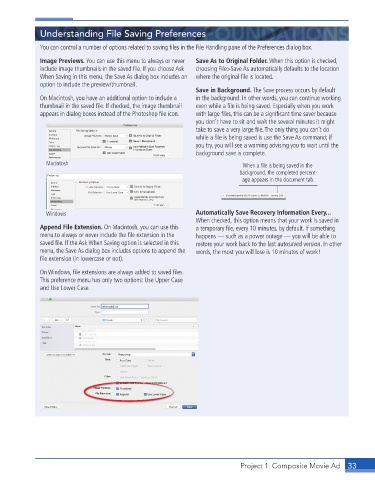
             You can control a number of options related to saving fi les in the File Handling pane of the Preferences dialog box.

             Image Previews. You can use this menu to always or never   Save As to Original Folder. When this option is checked,
             include image thumbnails in the saved fi le. If you choose Ask   choosing File>Save As automatically defaults to the location
             When Saving in this menu, the Save As dialog box includes an   where the original fi le is located.
             option to include the preview/thumbnail.
                                                             Save in Background. The Save process occurs by default
             On Macintosh, you have an additional option to include a   in the background. In other words, you can continue working
             thumbnail in the saved fi le. If checked, the image thumbnail   even while a fi le is being saved. Especially when you work
             appears in dialog boxes instead of the Photoshop fi le icon.   with large fi les, this can be a signifi cant time saver because
                                                             you don’t have to sit and wait the several minutes it might
                                                             take to save a very large fi le. The only thing you can’t do
                                                             while a fi le is being saved is use the Save As command; if
                                                             you try, you will see a warning advising you to wait until the
                                                             background save is complete.
               Macintosh                                                   When a file is being saved in the
                                                                          background, the completed percent-
                                                                           age appears in the document tab.


               Windows                                       Automatically Save Recovery Information Every...
                                                             When checked, this option means that your work is saved in
             Append File Extension. On Macintosh, you can use this   a temporary fi le, every 10 minutes, by default. If something
             menu to always or never include the fi le extension in the   happens — such as a power outage — you will be able to
             saved fi le. If the Ask When Saving option is selected in this   restore your work back to the last autosaved version. In other
             menu, the Save As dialog box includes options to append the   words, the most you will lose is 10 minutes of work!
             fi le extension (in lowercase or not).

             On Windows, fi le extensions are always added to saved fi les.
             This preference menu has only two options: Use Upper Case
             and Use Lower Case.


                                                                          Project 1: Composite Movie Ad    33

