


Page 71 - CC 2019 GD Look Inside
P. 71
11.  Choose the Selection tool in the Tools panel, and click away from all
                      artwork to deselect everything.

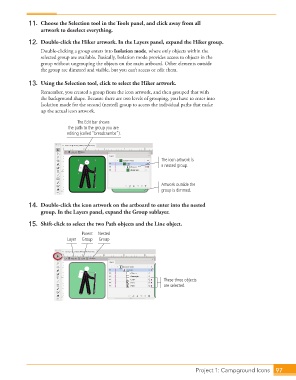
                  12.  Double-click the Hiker artwork. In the Layers panel, expand the Hiker group.
                      Double-clicking a group enters into Isolation mode, where only objects within the
                      selected group are available. Basically,  Isolation mode provides access to objects in the
                      group without ungrouping the objects on the main artboard. Other elements outside
                      the group are dimmed and visible, but you can’t access or edit them.

                  13.  Using the  Selection tool, click to select the Hiker artwork.
                      Remember, you created a group from the icon artwork, and then grouped that with
                      the background shape. Because there are two levels of grouping, you have to enter into
                      Isolation mode for the second (nested) group to access the individual paths that make
                      up the actual icon artwork.

                                    The Edit bar shows
                                the path to the group you are
                                editing (called “breadcrumbs”).


                                                                    The icon artwork is
                                                                    a nested group.


                                                                    Artwork outside the
                                                                    group is dimmed.


                  14.  Double-click the icon artwork on the artboard to enter into the nested
                      group. In the Layers panel, expand the Group sublayer.

                  15.  Shift-click to select the two Path objects and the Line object.
                                      Parent  Nested
                                Layer  Group  Group


                                                                     These three objects
                                                                     are selected.


                                                                                   Project 1: Campground Icons  97

