


Page 37 - CC 2019 GD Look Inside
P. 37
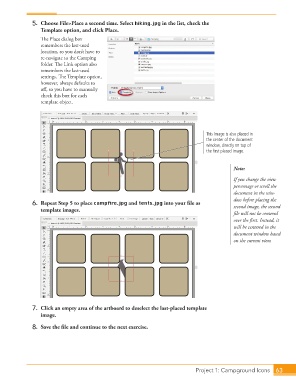
5.  Choose File>Place a second time. Select hiking.jpg in the list, check the
                      Template option, and click Place.
                      Th  e  Place dialog box
                      remembers the last-used
                      location, so you don’t have to
                      re-navigate to the Camping
                      folder. Th  e Link option also
                      remembers the last-used
                      settings. Th  e Template option,
                      however, always defaults to
                      off , so you have to manually
                      check this box for each
                      template object.


                                                                                     This image is also placed in
                                                                                     the center of the document
                                                                                     window, directly on top of
                                                                                     the first placed image.


                                                                                                Note:
                                                                                                If you change the view
                                                                                                percentage or scroll the
                                                                                                document in the win-
                                                                                                dow before placing the
                  6.  Repeat Step 5 to place campfi re.jpg and tents.jpg into your fi le as     second image, the second
                      template images.
                                                                                                fi le will not be centered
                                                                                                over the fi rst. Instead, it
                                                                                                will be centered in the
                                                                                                document window based
                                                                                                on the current view.


                  7.  Click an empty area of the artboard to deselect the last-placed template
                      image.
                  8.  Save the fi le and continue to the next exercise.


                                                                                   Project 1: Campground Icons  63

