


Page 34 - CC 2019 GD Look Inside
P. 34
Align and Distribute Objects                                            Note:

              In addition to dragging objects around the artboard, the Illustrator Align panel   When multiple objects are
              makes it very easy to align and distribute selected objects relative to one another, to   selected, you can access the
              a specifi c key object in the fi le, or to the overall  artboard. In this exercise, you learn   basic Align options in the
              how to use the Align panel to align shapes.
                                                                                            Properties panel. Click
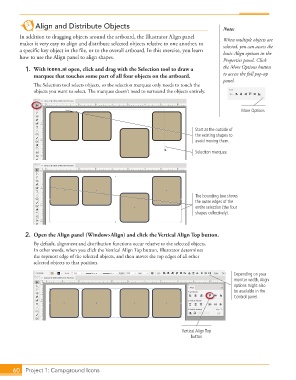
               1. With icons.ai open, click and drag with the  Selection tool to draw a     the More Options button
                   marquee that touches some part of all four objects on the artboard.      to access the full pop-up
                                                                                            panel.
                   Th  e Selection tool selects objects, so the selection marquee only needs to touch the
                   objects you want to select. Th  e marquee doesn’t need to surround the objects entirely.


                                                                                                   More Options


                                                                                 Start at the outside of
                                                                                 the existing shapes to
                                                                                 avoid moving them.

                                                                                 Selection marquee


                                                                                 The bounding box shows
                                                                                 the outer edges of the
                                                                                 entire selection (the four
                                                                                 shapes collectively).


               2.  Open the  Align panel (Window>Align) and click the Vertical Align Top button.
                   By default, alignment and distribution functions occur relative to the selected objects.
                   In other words, when you click the Vertical Align Top button, Illustrator determines
                   the topmost edge of the selected objects, and then moves the top edges of all other
                   selected objects to that position.

                                                                                                Depending on your
                                                                                                monitor width, Align
                                                                                                options might also
                                                                                                be available in the
                                                                                                Control panel.


                                                                            Vertical Align Top
                                                                               button


           60     Project 1: Campground Icons

