


Page 48 - CS6_PS_Look_Inside
P. 48
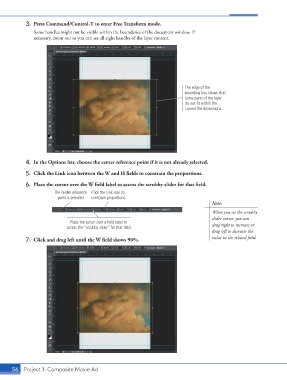
3.  Press Command/Control-T to enter Free Transform mode.
                    Some handles might not be visible within the boundaries of the document window. If
                    necessary, zoom out so you can see all eight handles of the layer content.


                                                                                  The edge of the
                                                                                  bounding box shows that
                                                                                  some parts of the layer
                                                                                  do not fit within the
                                                                                  current file dimensions.


                 4.  In the Options bar, choose the center reference point if it is not already selected.

                 5.  Click the Link icon between the W and H fields to constrain the proportions.

                 6.  Place the cursor over the W field label to access the scrubby slider for that field.
                             The center reference  Click the Link icon to
                              point is selected.  constrain proportions.
                                                                                             Note:

                                                                                             When you see the scrubby
                                                                                             slider cursor, you can
                                   Place the cursor over a field label to                    drag right to increase or
                                  access the “scrubby slider” for that field.
                                                                                             drag left to decrease the
                 7.  Click and drag left until the W field shows 90%.                        value in the related field.


           56 Project 1: Composite Movie Ad

