


Page 41 - CS6_PS_Look_Inside
P. 41
plAce Multiple eps grApHics
                  Vector graphics offer several advantages over raster images, including sharper edges
                  and free scaling without deteriorating image quality. To take advantage of these
                  benefits, you might want to maintain vector files as vector objects instead of rasterizing
                  them. Photoshop CS6 gives you the option to do exactly that — maintaining vector
                  information and raster information in the same file.

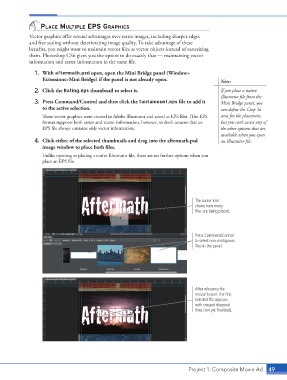
                    1.  With aftermath.psd open, open the Mini Bridge panel (Window>
                        Extensions>Mini Bridge) if the panel is not already open.                Note:

                    2.  Click the Rating.eps thumbnail to select it.                             If you place a native
                                                                                                 Illustrator file from the
                    3.  Press Command/Control and then click the Tantamount.eps file to add it   Mini Bridge panel, you
                        to the active selection.                                                 can define the Crop To
                        These vector graphics were created in Adobe Illustrator and saved as EPS files. (The EPS   area for the placement,
                        format supports both raster and vector information, however, so don’t assume that an   but you can’t access any of
                        EPS file always contains only vector information.                        the other options that are
                                                                                                 available when you open
                    4.  Click either of the selected thumbnails and drag into the aftermath.psd   an Illustrator file.
                        image window to place both files.
                        Unlike opening or placing a native Illustrator file, there are no further options when you
                        place an EPS file.


                                                                                      The cursor icon
                                                                                      shows how many
                                                                                      files are being placed.


                                                                                      Press Command/Control
                                                                                      to select non-contiguous
                                                                                      files in the panel.


                                                                                      After releasing the
                                                                                      mouse button, the first
                                                                                      selected file appears
                                                                                      with crossed diagonal
                                                                                      lines (not yet finalized).


                                                                                    Project 1: Composite Movie Ad   49

