


Page 28 - CC2019_PS_Look_Inside
P. 28
The Crop Tools in Depth (continued)

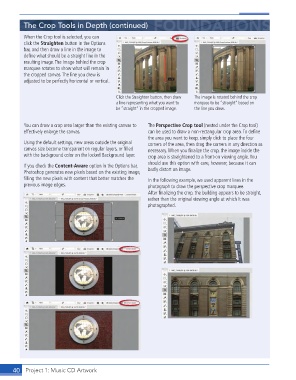
                When the Crop tool is selected, you can
                click the  Straighten button in the  Options
                bar, and then draw a line in the image to
                defi ne what should be a straight line in the
                resulting image. The image behind the crop
                marquee rotates to show what will remain in
                the cropped canvas. The line you drew is
                adjusted to be perfectly horizontal or vertical.


                                                   Click the Straighten button, then draw   The image is rotated behind the crop
                                                   a line representing what you want to   marquee to be “straight” based on
                                                   be “straight” in the cropped image.  the line you drew.


                You can draw a crop area larger than the existing canvas to   The  Perspective Crop tool (nested under the Crop tool)
                effectively enlarge the canvas.                can be used to draw a non-rectangular crop area. To defi ne
                                                               the area you want to keep, simply click to place the four
                Using the default settings, new areas outside the original   corners of the area, then drag the corners in any direction as
                canvas size become transparent on regular layers, or fi lled   necessary. When you fi nalize the crop, the image inside the
                with the background color on the locked Background layer.  crop area is straightened to a front-on viewing angle. You
                                                               should use this option with care, however, because it can
                If you check the  Content-Aware option in the Options bar,   badly distort an image.
                Photoshop generates new pixels based on the existing image,
                fi lling the new pixels with content that better matches the   In the following example, we used apparent lines in the
                previous image edges.                          photograph to draw the perspective crop marquee.
                                                               After fi nalizing the crop, the building appears to be straight,
                                                               rather than the original viewing angle at which it was
                                                               photographed.


           40     Project 1: Music CD Artwork

