


Page 23 - CC2019_PS_Look_Inside
P. 23
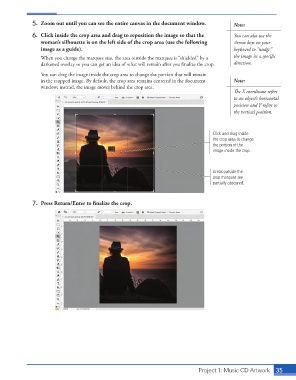
5.  Zoom out until you can see the entire canvas in the document window.     Note:

                   6.  Click inside the crop area and drag to reposition the image so that the   You can also use the
                      woman’s silhouette is on the left side of the crop area (use the following   Arrow keys on your
                      image as a guide).                                                        keyboard to “nudge”
                      When you change the marquee size, the area outside the marquee is “shielded” by a   the image in a specific
                      darkened overlay so you can get an idea of what will remain after you finalize the crop.   direction.
                      You can drag the image inside the crop area to change the portion that will remain
                      in the cropped image. By default, the crop area remains centered in the document   Note:
                      window; instead, the image moves behind the crop area.
                                                                                                The X coordinate refers
                                                                                                to an object’s horizontal
                                                                                                position and Y refers to
                                                                                                the vertical position.


                                                                                        Click and drag inside
                                                                                        the crop area to change
                                                                                        the portion of the
                                                                                        image inside the crop.


                                                                                        Areas outside the
                                                                                        crop marquee are
                                                                                        partially obscured.


                   7.  Press Return/Enter to finalize the crop.


                                                                                  Project 1: Music CD Artwork   35

