


Page 24 - CC2019_PS_Look_Inside
P. 24
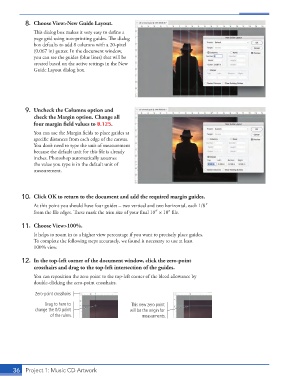
8.  Choose View>New Guide Layout.
                   This dialog box makes it very easy to define a
                   page grid using non-printing guides. The dialog
                   box defaults to add 8 columns with a 20-pixel
                   (0.067 in) gutter. In the document window,
                   you can see the guides (blue lines) that will be
                   created based on the active settings in the New
                   Guide Layout dialog box.


                9.  Uncheck the Columns option and
                   check the Margin option. Change all
                   four margin field values to 0.125.
                   You can use the Margin fields to place guides at
                   specific distances from each edge of the canvas.
                   You don’t need to type the unit of measurement
                   because the default unit for this file is already
                   inches. Photoshop automatically assumes
                   the value you type is in the default unit of
                   measurement.


               10.  Click OK to return to the document and add the required margin guides.
                   At this point you should have four guides – two vertical and two horizontal, each 1/8″
                   from the file edges. These mark the trim size of your final 10″ 1 10″ file.

               11.  Choose View>100%.
                   It helps to zoom in to a higher view percentage if you want to precisely place guides.
                   To complete the following steps accurately, we found it necessary to use at least
                   100% view.

               12.  In the top-left corner of the document window, click the zero-point
                   crosshairs and drag to the top-left intersection of the guides.
                   You can reposition the zero point to the top-left corner of the bleed allowance by
                   double-clicking the zero-point crosshairs.

                    Zero-point crosshairs
                        Drag to here to                  This new zero point
                    change the 0/0 point                will be the origin for
                          of the rulers.                     measurments.


           36   Project 1: Music CD Artwork

