


Page 70 - CC2018_PS_Look_Inside
P. 70
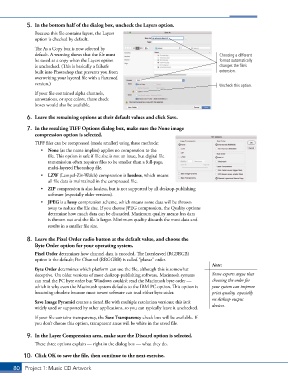
5.  In the bottom half of the dialog box, uncheck the Layers option.
               Because this file contains layers, the Layers
               option is checked by default.

               The As a Copy box is now selected by
               default. A warning shows that the file must                                  Choosing a different
               be saved as a copy when the Layers option                                    format automatically
               is unchecked. (This is basically a failsafe                                  changes the file’s
               built into Photoshop that prevents you from                                  extension.
               overwriting your layered file with a flattened
               version.)                                                                    Uncheck this option.
               If your file contained alpha channels,
               annotations, or spot colors, those check
               boxes would also be available.

            6.  Leave the remaining options at their default values and click Save.

            7.  In the resulting TIFF Options dialog box, make sure the None image
               compression option is selected.
               TIFF files can be compressed (made smaller) using three methods:
                  •  None (as the name implies) applies no compression to the
                     file. This option is safe if file size is not an issue, but digital file
                     transmission often requires files to be smaller than a full-page,
                     multi-layered Photoshop file.
                  •  LZW (Lempel-Ziv-Welch) compression is lossless, which means
                     all file data is maintained in the compressed file.
                  •  ZIP compression is also lossless, but is not supported by all desktop-publishing
                     software (especially older versions).
                  •  JPEG is a lossy compression scheme, which means some data will be thrown
                     away to reduce the file size. If you choose JPEG compression, the Quality options
                     determine how much data can be discarded. Maximum quality means less data
                     is thrown out and the file is larger. Minimum quality discards the most data and
                     results in a smaller file size.


            8.  Leave the Pixel Order radio button at the default value, and choose the
               Byte Order option for your operating system.

               Pixel Order determines how channel data is encoded. The Interleaved (RGBRGB)
               option is the default; Per Channel (RRGGBB) is called “planar” order.
                                                                                        Note:
               Byte Order determines which platform can use the file, although this is somewhat
               deceptive. On older versions of most desktop-publishing software, Macintosh systems   Some experts argue that
               can read the PC byte order but Windows couldn’t read the Macintosh byte order —   choosing the order for
               which is why even the Macintosh system defaults to the IBM PC option. This option is   your system can improve
               becoming obsolete because most newer software can read either byte order.   print quality, especially
                                                                                        on desktop output
               Save Image Pyramid creates a tiered file with multiple resolution versions; this isn’t
               widely used or supported by other applications, so you can typically leave it unchecked.   devices.

               If your file contains transparency, the Save Transparency check box will be available. If
               you don’t choose this option, transparent areas will be white in the saved file.


            9.  In the Layer Compression area, make sure the Discard option is selected.
               These three options explain — right in the dialog box — what they do.

           10.  Click OK to save the file, then continue to the next exercise.

       80 Project 1: Music CD Artwork

