


Page 66 - CC2018_PS_Look_Inside
P. 66
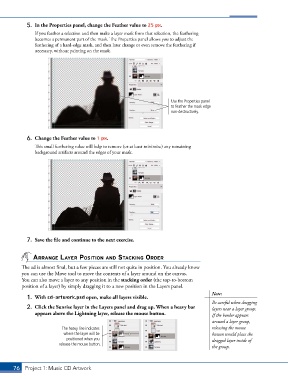
5.  In the Properties panel, change the Feather value to 25 px.
               If you feather a selection and then make a layer mask from that selection, the feathering
               becomes a permanent part of the mask. The Properties panel allows you to adjust the
               feathering of a hard-edge mask, and then later change or even remove the feathering if
               necessary, without painting on the mask.


                                                                        Use the Properties panel
                                                                        to feather the mask edge
                                                                        non-destructively.


            6.  Change the Feather value to 1 px.
               This small feathering value will help to remove (or at least minimize) any remaining
               background artifacts around the edges of your mask.


            7.  Save the file and continue to the next exercise.


               arrangE layEr posItIon and stackIng ordEr
          The ad is almost final, but a few pieces are still not quite in position. You already know
          you can use the Move tool to move the contents of a layer around on the canvas.
          You can also move a layer to any position in the stacking order (the top-to-bottom
          position of a layer) by simply dragging it to a new position in the Layers panel.
                                                                                        Note:
            1.  With cd-artwork.psd open, make all layers visible.
                                                                                        Be careful when dragging
            2.  Click the Sunrise layer in the Layers panel and drag up. When a heavy bar   layers near a layer group:
               appears above the Lightning layer, release the mouse button.             If the border appears
                                                                                        around a layer group,
                           The heavy line indicates                                     releasing the mouse
                           where the layer will be                                      button would place the
                            positioned when you                                         dragged layer inside of
                         release the mouse button.
                                                                                        the group.


       76 Project 1: Music CD Artwork

