


Page 73 - CC2018_PS_Look_Inside
P. 73
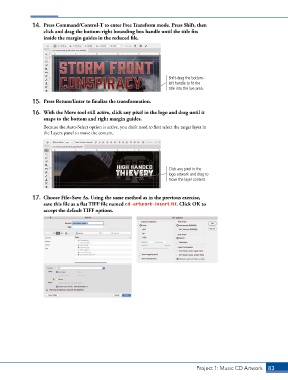
14.  Press Command/Control-T to enter Free Transform mode. Press Shift, then
                   click and drag the bottom-right bounding box handle until the title fits
                   inside the margin guides in the reduced file.


                                                                       Shift-drag the bottom-
                                                                       left handle to fit the
                                                                       title into the live area.

               15.  Press Return/Enter to finalize the transformation.

               16.  With the Move tool still active, click any pixel in the logo and drag until it
                   snaps to the bottom and right margin guides.
                   Because the Auto-Select option is active, you don’t need to first select the target layer in
                   the Layers panel to move the content.


                                                                       Click any pixel in the
                                                                       logo artwork and drag to
                                                                       move the layer content.


               17.  Choose File>Save As. Using the same method as in the previous exercise,
                   save this file as a flat TIFF file named cd-artwork-insert.tif. Click OK to
                   accept the default TIFF options.


                                                                                  Project 1: Music CD Artwork   83

