


Page 26 - CC 2019 ID Look Inside
P. 26
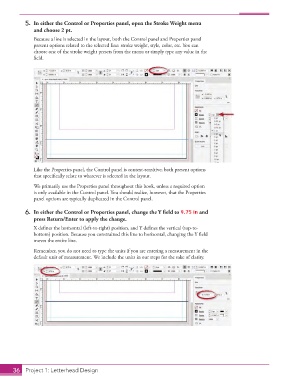
5.  In either the Control or   Properties panel, open the  Stroke Weight menu
                   and choose 2 pt.
                   Because a line is selected in the layout, both the Control panel and  Properties panel
                   present options related to the selected line: stroke weight, style, color, etc. You can
                   choose one of the stroke weight presets from the menu or simply type any value in the
                   fi eld.


                   Like the  Properties panel, the Control panel is context-sensitive; both present options
                   that specifi cally relate to whatever is selected in the layout.

                   We primarily use the Properties panel throughout this book, unless a required option
                   is only available in the Control panel. You should realize, however, that the  Properties
                   panel options are typically duplicated in the Control panel.

               6.  In either the Control or  Properties panel, change the Y fi eld to 9.75 in and
                   press Return/Enter to apply the change.
                   X defi nes the horizontal (left-to-right) position, and Y defi nes the vertical (top-to-
                   bottom) position. Because you constrained this line to horizontal, changing the Y fi eld
                   moves the entire line.
                   Remember, you do not need to type the units if you are entering a measurement in the
                   default unit of measurement. We include the units in our steps for the sake of clarity.


           36     Project 1: Letterhead Design

