


Page 19 - CC 2019 ID Look Inside
P. 19
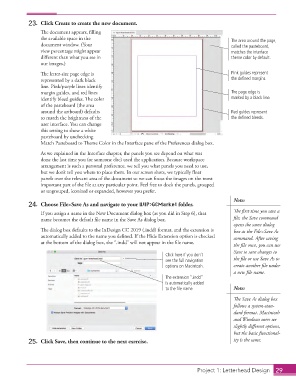
23.  Click Create to create the new document.
                      Th  e document appears, fi lling
                      the available space in the                                               The area around the page,
                      document  window. (Your                                                  called the pasteboard,
                      view percentage might appear                                             matches the interface
                      diff erent than what you see in                                          theme color by default.
                      our  images.)
                      Th  e letter-size page edge is                                           Pink guides represent
                      represented by a dark black                                              the defined margins.
                      line. Pink/purple lines identify
                      margin guides, and red lines                                             The page edge is
                      identify bleed guides. Th  e color                                       marked by a black line.
                      of the  pasteboard (the area
                      around the artboard) defaults                                            Red guides represent
                      to match the brightness of the                                           the defined bleeds.
                      user interface. You can change
                      this setting to show a white
                      pasteboard by unchecking
                      Match Pasteboard to Th  eme Color in the  Interface pane of the Preferences dialog box.
                      As we explained in the Interface chapter, the panels you see depend on what was
                      done the last time you (or someone else) used the application. Because workspace
                      arrangement is such a personal preference, we tell you what panels you need to use,
                      but we don’t tell you where to place them. In our screen shots, we typically fl oat
                      panels over the relevant area of the document so we can focus the images on the most
                      important part of the fi le at any particular point. Feel free to dock the panels, grouped
                      or ungrouped, iconized or expanded, however you prefer.
                                                                                                Note:
                  24.  Choose File>Save As and navigate to your WIP>GCMarket folder.

                      If you assign a name in the New Document dialog box (as you did in Step 6), that   Th  e fi rst time you save a
                      name becomes the default fi le name in the  Save As dialog box.           fi le, the Save command
                                                                                                opens the same dialog
                      Th  e dialog box defaults to the InDesign CC 2019 (.indd) format, and the extension is   box as the File>Save As
                      automatically added to the name you defi ned. If the Hide Extension option is checked   command. After saving
                      at the bottom of the dialog box, the “.indd” will not appear in the fi le name.
                                                                                                the fi le once, you can use
                                                                                                Save to save changes to
                                                                      Click here if you don’t
                                                                      see the full navigation   the fi le or use Save As to
                                                                      options on Macintosh.     create another fi le under
                                                                                                a new fi le name.
                                                                      The extension “.indd”
                                                                      is automatically added
                                                                      to the file name.         Note:
                                                                                                Th  e Save As dialog box
                                                                                                follows a system-stan-
                                                                                                dard format. Macintosh
                                                                                                and Windows users see
                                                                                                slightly diff erent options,
                                                                                                but the basic functional-
                  25.  Click Save, then continue to the next exercise.                          ity is the same.


                                                                                    Project 1: Letterhead Design  29

