


Page 50 - CC2018_ID_Look_Inside
P. 50
Content Fitting Options
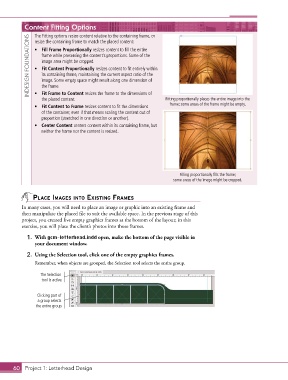
               The Fitting options resize content relative to the containing frame, or
             INDESIGN FOUNDATIONS  •  Fill Frame Proportionally resizes content to fill the entire
               resize the containing frame to match the placed content:


                  frame while preserving the content’s proportions. Some of the
                  image area might be cropped.
               •  Fit Content Proportionally resizes content to fit entirely within
                  its containing frame, maintaining the current aspect ratio of the
                  image. Some empty space might result along one dimension of
                  the frame.
               •  Fit Frame to Content resizes the frame to the dimensions of
                  the placed content.                                Fitting proportionally places the entire image into the
               •  Fit Content to Frame resizes content to fit the dimensions   frame; some areas of the frame might be empty.
                  of the container, even if that means scaling the content out of
                  proportion (stretched in one direction or another).
               •  Center Content centers content within its containing frame, but
                  neither the frame nor the content is resized.


                                                                           Filling proportionally fills the frame;
                                                                         some areas of the image might be cropped.


               plACe imAges into existing frAmes
          In many cases, you will need to place an image or graphic into an existing frame and
          then manipulate the placed file to suit the available space. In the previous stage of this
          project, you created five empty graphics frames at the bottom of the layout; in this
          exercise, you will place the client’s photos into those frames.

            1.  With gcm-letterhead.indd open, make the bottom of the page visible in
               your document window.

            2.  Using the Selection tool, click one of the empty graphics frames.
               Remember, when objects are grouped, the Selection tool selects the entire group.

                  The Selection
                  tool is active.


                Clicking part of
                 a group selects
                the entire group.


       60 Project 1: Letterhead Design

