


Page 55 - CC2018_ID_Look_Inside
P. 55
4.  Type Grand Cuisine. Grand Culture. Grand Central.
                   The text appears, beginning at the flashing insertion point. Depending on the size of
                   your frame, the text might automatically wrap to a second line within the frame or
                   might not fit into the frame (indicated by a red X, called an overset text icon).  Note:
                   New text in InDesign is automatically set in black 12-pt Minion Pro. This font is   Type defaults to a 100%
                   installed along with the application, so it should be available on your computer unless   black fill with no stroke.
                   someone has modified your system fonts. Don’t worry if your type appears in some other   (You can apply a stroke
                   font; you will change it shortly.                                        to type, but you should
                                                                                            be very careful when you
                                                                                            do to avoid destroying the
                                                                                            letter shapes.)


                5.  Choose the Selection tool in the Tools panel.
                   You must use the Selection tool to change the position and size of a text frame. You can
                   either drag the handles to manually change the frame, or use the Control panel options
                   to define specific parameters.

                6.  In the Control panel, make sure the constrain option is not active for the
                   W and H fields. Choose the top-left reference point and then change the
                   frame’s dimensions to:
                        X: 0.25 in       W: 4.5 in
                        Y: 9.5 in        H: 0.25 in
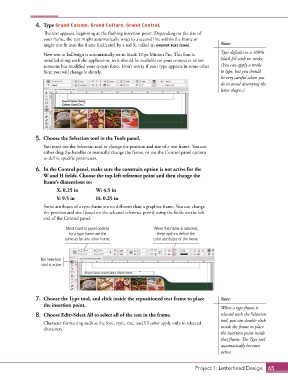
                   Some attributes of a type frame are no different than a graphics frame. You can change
                   the position and size (based on the selected reference point) using the fields on the left
                   end of the Control panel.

                            Most Control panel options           When the frame is selected,
                             for a type frame are the             these options define the
                            same as for any other frame.        color attributes of the frame.


                  The Selection
                  tool is active.


                7.  Choose the Type tool, and click inside the repositioned text frame to place   Note:
                   the insertion point.
                                                                                            When a type frame is
                8.  Choose Edit>Select All to select all of the text in the frame.          selected with the Selection
                                                                                            tool, you can double-click
                   Character formatting such as the font, style, size, and fill color apply only to selected
                   characters.                                                              inside the frame to place
                                                                                            the insertion point inside
                                                                                            that frame. The Type tool
                                                                                            automatically becomes
                                                                                            active.


                                                                                  Project 1: Letterhead Design  65

