


Page 49 - CC2018_ID_Look_Inside
P. 49
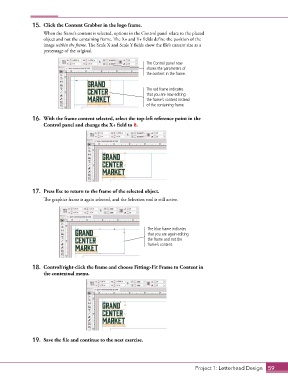
15.  Click the Content Grabber in the logo frame.
                   When the frame’s content is selected, options in the Control panel relate to the placed
                   object and not the containing frame. The X+ and Y+ fields define the position of the
                   image within the frame. The Scale X and Scale Y fields show the file’s current size as a
                   percentage of the original.


                                                             The Control panel now
                                                             shows the parameters of
                                                             the content in the frame.


                                                             The red frame indicates
                                                             that you are now editing
                                                             the frame’s content instead
                                                             of the containing frame.


               16.  With the frame content selected, select the top-left reference point in the
                   Control panel and change the X+ field to 0.


               17.  Press Esc to return to the frame of the selected object.

                   The graphics frame is again selected, and the Selection tool is still active.


                                                              The blue frame indicates
                                                              that you are again editing
                                                              the frame and not the
                                                              frame’s content.


               18.  Control/right-click the frame and choose Fitting>Fit Frame to Content in
                   the contextual menu.


               19.  Save the file and continue to the next exercise.


                                                                                  Project 1: Letterhead Design  59

