


Page 27 - CC2018_ID_Look_Inside
P. 27
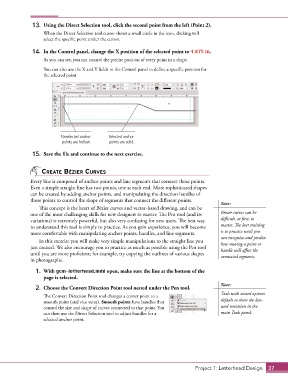
13.  Using the Direct Selection tool, click the second point from the left (Point 2).
                   When the Direct Selection tool cursor shows a small circle in the icon, clicking will
                   select the specific point under the cursor.

               14.  In the Control panel, change the X position of the selected point to 4.875 in.

                   As you can see, you can control the precise position of every point in a shape.
                   You can also use the X and Y fields in the Control panel to define a specific position for
                   the selected point.


                          Unselected anchor   Selected anchor
                           points are hollow.  points are solid.

               15.  Save the file and continue to the next exercise.


                  CreAte bézier Curves
              Every line is composed of anchor points and line segments that connect those points.
              Even a simple straight line has two points, one at each end. More sophisticated shapes
              can be created by adding anchor points, and manipulating the direction handles of
              those points to control the shape of segments that connect the different points.
                                                                                            Note:
                 This concept is the heart of Bézier curves and vector-based drawing, and can be
              one of the most challenging skills for new designers to master. The Pen tool (and its   Bézier curves can be
              variations) is extremely powerful, but also very confusing for new users. The best way   difficult, at first, to
              to understand this tool is simply to practice. As you gain experience, you will become   master. The best training
              more comfortable with manipulating anchor points, handles, and line segments.   is to practice until you
                 In this exercise you will make very simple manipulations to the straight line you   can recognize and predict
                                                                                            how moving a point or
              just created. We also encourage you to practice as much as possible using the Pen tool   handle will affect the
              until you are more proficient; for example, try copying the outlines of various shapes   connected segments.
              in photographs.

                1.  With gcm-letterhead.indd open, make sure the line at the bottom of the
                   page is selected.
                                                                                            Note:
                2.  Choose the Convert Direction Point tool nested under the Pen tool.
                                                                                            Tools with nested options
                   The Convert Direction Point tool changes a corner point to a
                   smooth point (and vice versa). Smooth points have handles that           default to show the last-
                   control the size and shape of curves connected to that point. You        used variation in the
                   can then use the Direct Selection tool to adjust handles for a           main Tools panel.
                   selected anchor point.


                                                                                  Project 1: Letterhead Design  37

