


Page 29 - CC2018_ID_Look_Inside
P. 29
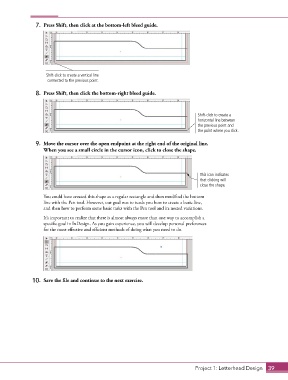
7.  Press Shift, then click at the bottom-left bleed guide.


                    Shift-click to create a vertical line
                     connected to the previous point.

                8.  Press Shift, then click the bottom-right bleed guide.


                                                                                   Shift-click to create a
                                                                                   horizontal line between
                                                                                   the previous point and
                                                                                   the point where you click.

                9.  Move the cursor over the open endpoint at the right end of the original line.
                   When you see a small circle in the cursor icon, click to close the shape.


                                                                                    This icon indicates
                                                                                    that clicking will
                                                                                    close the shape.

                   You could have created this shape as a regular rectangle and then modified the bottom
                   line with the Pen tool. However, our goal was to teach you how to create a basic line,
                   and then how to perform some basic tasks with the Pen tool and its nested variations.
                   It’s important to realize that there is almost always more than one way to accomplish a
                   specific goal in InDesign. As you gain experience, you will develop personal preferences
                   for the most effective and efficient methods of doing what you need to do.


               10.  Save the file and continue to the next exercise.


                                                                                  Project 1: Letterhead Design  39

