


Page 59 - CC2018_WD_Look_Inside
P. 59
More on Selecting a Color Range                   how far away (in physical distance) a color can be located
                   Selecting Localized Color Clusters
                 PHOTOSHOP FOUNDATIONS  color. When this option is checked, the Range slider defines   The same colors in other
                   The Localized Color Clusters option in the Color Range
                                                                 from the point you click and still be included in the selection.
                   dialog box can be used to select specific areas of a selected


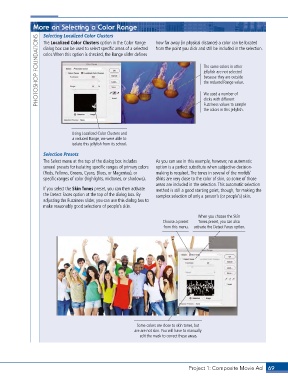
                                                                                     jellyfish are not selected
                                                                                     because they are outside
                                                                                     the reduced Range value.


                                                                                     We used a number of
                                                                                     clicks with different
                                                                                     Fuzziness values to sample
                                                                                     the colors in this jellyfish.


                               Using Localized Color Clusters and
                               a reduced Range, we were able to
                               isolate this jellyfish from its school.

                   Selection Presets
                   The Select menu at the top of the dialog box includes   As you can see in this example, however, no automatic
                   several presets for isolating specific ranges of primary colors   option is a perfect substitute when subjective decision-
                   (Reds, Yellows, Greens, Cyans, Blues, or Magentas), or   making is required. The tones in several of the models’
                   specific ranges of color (highlights, midtones, or shadows).   shirts are very close to the color of skin, so some of those
                                                                 areas are included in the selection. This automatic selection
                   If you select the Skin Tones preset, you can then activate   method is still a good starting point, though, for making the
                   the Detect Faces option at the top of the dialog box. By   complex selection of only a person’s (or people’s) skin.
                   adjusting the Fuzziness slider, you can use this dialog box to
                   make reasonably good selections of people’s skin.

                                                                                   When you choose the Skin
                                                                    Choose a preset   Tones preset, you can also
                                                                    from this menu.  activate the Detect Faces option.


                                                         Some colors are close to skin tones, but
                                                         are are not skin. You will have to manually
                                                           edit the mask to correct these areas.


                                                                               Project 1: Composite Movie Ad    69

