


Page 18 - CC2018_WD_Look_Inside
P. 18
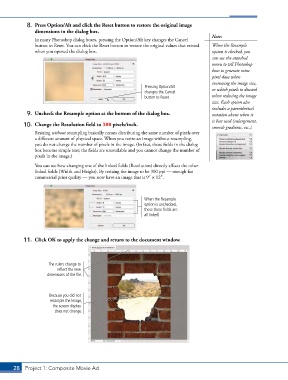
8.  Press Option/Alt and click the Reset button to restore the original image
               dimensions in the dialog box.
                                                                                        Note:
               In many Photoshop dialog boxes, pressing the Option/Alt key changes the Cancel
               button to Reset. You can click the Reset button to restore the original values that existed   When the Resample
               when you opened the dialog box.                                          option is checked, you
                                                                                        can use the attached
                                                                                        menu to tell Photoshop
                                                                                        how to generate extra
                                                                                        pixel data when
                                                                                        increasing the image size,
                                                             Pressing Option/Alt        or which pixels to discard
                                                             changes the Cancel
                                                             button to Reset.           when reducing the image
                                                                                        size. Each option also
                                                                                        includes a parenthetical
            9.  Uncheck the Resample option at the bottom of the dialog box.            notation about when it
                                                                                        is best used (enlargement,
           10.  Change the Resolution field to 300 pixels/inch.                         smooth gradients, etc.).
               Resizing without resampling basically means distributing the same number of pixels over
               a different amount of physical space. When you resize an image without resampling,
               you do not change the number of pixels in the image. (In fact, those fields in the dialog
               box become simple text; the fields are unavailable and you cannot change the number of
               pixels in the image.)

               You can see how changing one of the linked fields (Resolution) directly affects the other
               linked fields (Width and Height). By resizing the image to be 300 ppi — enough for
               commercial print quality — you now have an image that is 93 1 123.


                                                             When the Resample
                                                             option is unchecked,
                                                             these three fields are
                                                             all linked.


           11.  Click OK to apply the change and return to the document window.


                     The rulers change to
                         reflect the new
                    dimensions of the file.


                     Because you did not
                      resample the image,
                       the screen display
                        does not change.


       28 Project 1: Composite Movie Ad

