


Page 15 - CC2018_WD_Look_Inside
P. 15
Stage 1  Compositing Images and Artwork


              There are two primary types of artwork: vector graphics and raster images.
                 •  Vector graphics are composed of mathematical descriptions of a series of lines
                    and geometric shapes. These files are commonly created in illustration   Note:
                    (“drawing”) applications like Adobe Illustrator. Vector graphics are resolution
                    independent; they can be freely scaled and are automatically output at the   Why is this information
                    resolution of the output device.                                        important? The ad you’re
                                                                                            building in this project
                 •  Raster images are made up of a grid of individual pixels (rasters or bits) in   will be placed in print
                    rows and columns (called a bitmap). Raster files are resolution dependent   magazines, so you have
                    — their resolution is determined when you scan, photograph, or create the   to build the new file with
                    file. (Line art, sometimes categorized as a third type of image, is actually a   the appropriate settings
                    type of raster image that includes only black and white pixels.)        for commercial printing.
                                                                                            When the composition is
                 Photoshop is what some people call a “paint” program — it is primarily     finished, you will convert
              used to create and manipulate pixel-based or raster images. Raster-image quality   it to a resolution and
              depends directly on the resolution; when you create files in Photoshop, you need to   file format that is more
              understand the resolution requirements from the very beginning of the process.   appropriate for digital
                 Pixels per inch (ppi) is the number of pixels in one horizontal or vertical inch   media display.
              of a digital raster file. As a general rule, commercial print jobs require 240–300 pixels
              per inch at the final output size to achieve good image quality in the printed piece. Some digital media
              such as desktop web browsers typically
              require much lower resolution, commonly
              72 ppi, although monitors and mobile
              devices with HD display capabilities
              support higher-resolution images.
                 It is important to realize that you
              cannot significantly increase image
              resolution once a raster image has been
              created or captured. When you create files
              that will be used for both print and digital
              media — as in the case of this project —
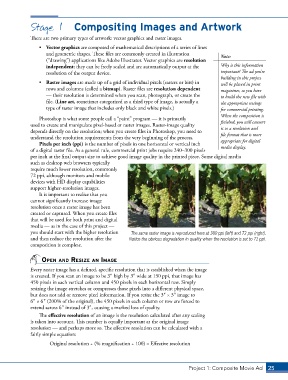
              you should start with the higher resolution   The same raster image is reproduced here at 300 ppi (left) and 72 ppi (right).
              and then reduce the resolution after the   Notice the obvious degradation in quality when the resolution is set to 72 ppi.
              composition is complete.


                  open And resize An imAge

              Every raster image has a defined, specific resolution that is established when the image
              is created. If you scan an image to be 33 high by 33 wide at 150 ppi, that image has
              450 pixels in each vertical column and 450 pixels in each horizontal row. Simply
              resizing the image stretches or compresses those pixels into a different physical space,
              but does not add or remove pixel information. If you resize the 33 × 33 image to
              63 × 63 (200% of the original), the 450 pixels in each column or row are forced to
              extend across 63 instead of 33, causing a marked loss of quality.
                 The effective resolution of an image is the resolution calculated after any scaling
              is taken into account. This number is equally important as the original image
              resolution — and perhaps more so. The effective resolution can be calculated with a
              fairly simple equation:

                      Original resolution ÷ (% magnification ÷ 100) = Effective resolution


                                                                               Project 1: Composite Movie Ad    25

