


Page 27 - CC2017_WD_Look_Inside
P. 27
8.  Click the bottle.jpg window to activate that file. If you can’t see the entire
                   bottle, zoom out until you can.
                                                                                            Note:
                9.  Choose the Rectangular Marquee tool in the Tools panel.
                                                                                            Use the marquee tools
                   In addition to dragging entire layers into other files, you can also select specific areas of a   to create simple-shape
                   file to copy using one of the selection tools.
                                                                                            selections such as
                                                                                            rectangular, elliptical,
               10.  Using the Rectangular Marquee tool, click in the bottle.jpg window and   single row of pixels, or a
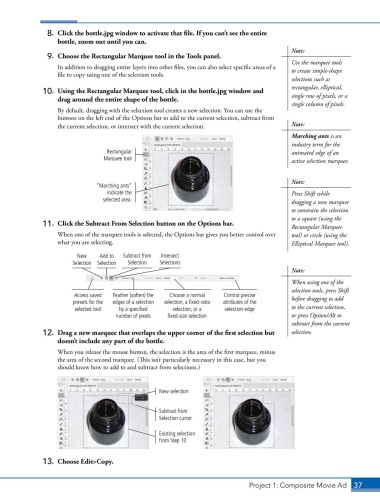
                   drag around the entire shape of the bottle.
                                                                                            single column of pixels.
                   By default, dragging with the selection tool creates a new selection. You can use the
                   buttons on the left end of the Options bar to add to the current selection, subtract from
                   the current selection, or intersect with the current selection.          Note:
                                                                                            Marching ants is an
                                                                                            industry term for the
                                  Rectangular                                               animated edge of an
                                 Marquee tool                                               active selection marquee.


                                                                                            Note:
                               “Marching ants”
                                   indicate the                                             Press Shift while
                                 selected area.                                             dragging a new marquee
                                                                                            to constrain the selection
                                                                                            to a square (using the
               11.  Click the Subtract From Selection button on the Options bar.            Rectangular Marquee
                   When one of the marquee tools is selected, the Options bar gives you better control over   tool) or circle (using the
                   what you are selecting.                                                  Elliptical Marquee tool).

                         New    Add to  Subtract from   Intersect
                        Selection  Selection  Selection  Selections
                                                                                            Note:
                                                                                            When using one of the
                                                                                            selection tools, press Shift
                        Access saved   Feather (soften) the   Choose a normal   Control precise   before dragging to add
                        presets for the   edges of a selection   selection, a fixed-ratio   attributes of the
                        selected tool  by a specified   selection, or a   selection edge    to the current selection,
                                     number of pixels  fixed-size selection                 or press Option/Alt to
                                                                                            subtract from the current
               12.  Drag a new marquee that overlaps the upper corner of the first selection but   selection.
                   doesn’t include any part of the bottle.
                   When you release the mouse button, the selection is the area of the first marquee, minus
                   the area of the second marquee. (This isn’t particularly necessary in this case, but you
                   should know how to add to and subtract from selections.)


                                                   New selection


                                                   Subtract from
                                                   Selection cursor

                                                   Existing selection
                                                   from Step 10


               13.  Choose Edit>Copy.


                                                                               Project 1: Composite Movie Ad    37

