


Page 79 - Adobe Photoshop and Dreamviewer 2021
P. 79
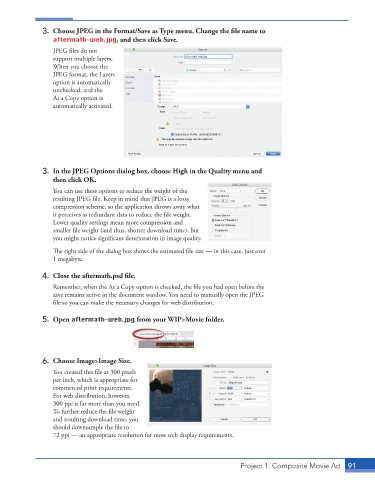
3.  Choose JPEG in the Format/Save as Type menu. Change the fi le name to
                 aftermath-web.jpg, and then click Save.
                 JPEG files do not

                 support multiple layers.
                 When you choose the
                 JPEG format, the Layers
                 option is automatically
                 unchecked, and the
                 As a Copy option is
                 automatically activated.


             3.  In the JPEG Options dialog box, choose High in the Quality menu and
                 then click OK.

                 You can use these options to reduce the weight of the
                 resulting JPEG file. Keep in mind that JPEG is a lossy

                 compression scheme, so the application throws away what
                 it perceives as redundant data to reduce the file weight.

                 Lower quality settings mean more compression and

                 smaller file weight (and thus, shorter download time), but

                 you might notice significant deterioration in image quality.


                 The right side of the dialog box shows the estimated file size — in this case, just over
                 1 megabyte.
             4.  Close the aftermath.psd fi le.

                 Remember, when the As a Copy option is checked, the file you had open before the
                 save remains active in the document window. You need to manually open the JPEG

                 file so you can make the necessary changes for web distribution.
             5. Open aftermath-web.jpg from your WIP>Movie folder.


             6.  Choose Image>Image Size.
                 You created this file at 300 pixels

                 per inch, which is appropriate for
                 commercial print requirements.
                 For web distribution, however,
                 300 ppi is far more than you need.
                 To further reduce the file weight

                 and resulting download time, you
                 should downsample the file to

                 72 ppi — an appropriate resolution for most web display requirements.


                                                                          Project 1: Composite Movie Ad    91

