


Page 74 - CC 2019 GD Look Inside
P. 74
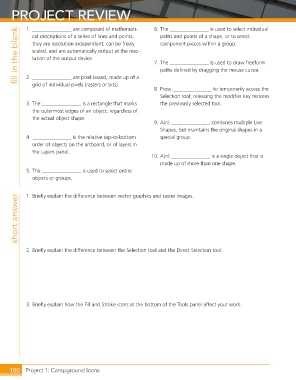
PROJECT REVIEW                                       6. The _______________ is used to select individual


                 1. _______________ are composed of mathemati-
             fill in the blank  cal descrip tions of a series of lines and points;     7. The _______________ is used to draw freeform
                                                                    paths and points of a shape, or to select
                   they are resolution independent, can be freely
                                                                    component pieces within a group.
                   scaled, and are auto matically output at the reso-
                   lution of the output device.

                                                                    paths defi ned by dragging the mouse cursor.
                 2. _______________ are pixel-based, made up of a

                   grid of individual pixels (rasters or bits).
                                                                  8. Press _______________ to temporarily access the
                                                                    Selection tool; releasing the modifi er key restores
                 3. The _______________ is a rectangle that marks   the previously selected tool.
                   the outermost edges of an object, regardless of
                   the actual object shape.
                                                                  9. A(n) _______________ combines multiple Live
                                                                    Shapes, but maintains the original shapes in a
                 4. _______________ is the relative top-to-bottom   special group.
                   order of objects on the artboard, or of layers in
                   the Layers panel.
                                                                 10. A(n) _______________ is a single object that is
                                                                    made up of more than one shape.
                 5. The _______________ is used to select entire
                   objects or groups.


                 1. Briefl y explain the difference between vector graphics and raster images.
             short answer


                 2. Briefl y explain the difference between the Selection tool and the Direct Selection tool.


                 3. Briefl y explain how the Fill and Stroke icons at the bottom of the Tools panel affect your work.


          100     Project 1: Campground Icons

