


Page 45 - CC 2019 GD Look Inside
P. 45
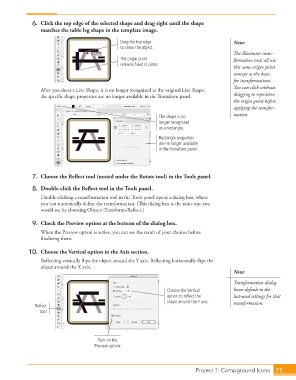
6.  Click the top edge of the selected shape and drag right until the shape
                      matches the table leg shape in the template image.

                                                    Drag the top edge                           Note:
                                                    to shear the object.
                                                                                                The Illustrator trans-
                                                    The origin point                            formation tools all use
                                                    remains fixed in place.
                                                                                                this same origin point
                                                                                                concept as the basis
                                                                                                for transformations.
                                                                                                You can click without
                      After you shear a Live Shape, it is no longer recognized as the original Live Shape;
                      the specific shape properties are no longer available in the Transform panel.  dragging to reposition
                                                                                                the origin point before
                                                                                                applying the transfor-
                                                                   The shape is no              mation.
                                                                   longer recognized
                                                                   as a rectangle.

                                                                   Rectangle properties
                                                                   are no longer available
                                                                   in the Transform panel.


                   7.  Choose the Reflect tool (nested under the Rotate tool) in the Tools panel.

                   8.  Double-click the Reflect tool in the Tools panel.
                      Double-clicking a transformation tool in the Tools panel opens a dialog box, where
                      you can numerically define the transformation. (This dialog box is the same one you
                      would see by choosing Object>Transform>Reflect.)

                   9.  Check the Preview option at the bottom of the dialog box.
                      When the Preview option is active, you can see the result of your choices before
                      finalizing them.

                  10.  Choose the Vertical option in the Axis section.
                      Reflecting vertically flips the object around the Y axis. Reflecting horizontally flips the
                      object around the X axis.
                                                                                                Note:
                                                                                                Transformation dialog
                                                                      Choose the Vertical       boxes default to the
                                                                      option to reflect the     last-used settings for that
                                                                      shape around the Y axis.  transformation.
                    Reflect
                      tool


                                            Turn on the
                                           Preview option.


                                                                                 Project 1: Campground Icons    71

