


Page 55 - CS6_PS_Look_Inside
P. 55
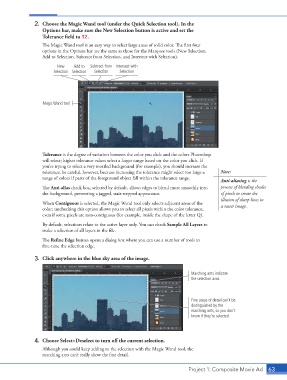
2.  Choose the Magic Wand tool (under the Quick Selection tool). In the
                        Options bar, make sure the New Selection button is active and set the
                        Tolerance field to 32.
                        The Magic Wand tool is an easy way to select large areas of solid color. The first four
                        options in the Options bar are the same as those for the Marquee tools (New Selection,
                        Add to Selection, Subtract from Selection, and Intersect with Selection).

                              New    Add to   Subtract from  Intersect with
                            Selection Selection  Selection  Selection


                        Magic Wand tool


                        Tolerance is the degree of variation between the color you click and the colors Photoshop
                        will select; higher tolerance values select a larger range based on the color you click. If
                        you’re trying to select a very mottled background (for example), you should increase the
                        tolerance; be careful, however, because increasing the tolerance might select too large a   Note:
                        range of colors if parts of the foreground object fall within the tolerance range.
                                                                                                 Anti-aliasing is the
                        The Anti-alias check box, selected by default, allows edges to blend more smoothly into   process of blending shades
                        the background, preventing a jagged, stair-stepped appearance.           of pixels to create the
                                                                                                 illusion of sharp lines in
                        When Contiguous is selected, the Magic Wand tool only selects adjacent areas of the   a raster image.
                        color; unchecking this option allows you to select all pixels within the color tolerance,
                        even if some pixels are non-contiguous (for example, inside the shape of the letter Q).
                        By default, selections relate to the active layer only. You can check Sample All Layers to
                        make a selection of all layers in the file.
                        The Refine Edge button opens a dialog box where you can use a number of tools to
                        fine-tune the selection edge.

                    3.  Click anywhere in the blue sky area of the image.


                                                                                     Marching ants indicate
                                                                                     the selection area.


                                                                                     Fine areas of detail can’t be
                                                                                     distinguished by the
                                                                                     marching ants, so you don’t
                                                                                     know if they’re selected.


                    4.  Choose Select>Deselect to turn off the current selection.
                        Although you could keep adding to the selection with the Magic Wand tool, the
                        marching ants can’t really show the fine detail.


                                                                                    Project 1: Composite Movie Ad   63

