


Page 59 - CS6_PS_Look_Inside
P. 59
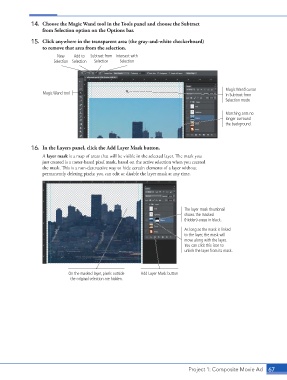
14.  Choose the Magic Wand tool in the Tools panel and choose the Subtract
                        from Selection option on the Options bar.

                   15.  Click anywhere in the transparent area (the gray-and-white checkerboard)
                        to remove that area from the selection.
                              New    Add to   Subtract from  Intersect with
                            Selection Selection  Selection  Selection


                                                                                                   Magic Wand cursor
                        Magic Wand tool                                                            in Subtract from
                                                                                                   Selection mode


                                                                                                   Marching ants no
                                                                                                   longer surround
                                                                                                   the background.


                   16.  In the Layers panel, click the Add Layer Mask button.
                        A layer mask is a map of areas that will be visible in the selected layer. The mask you
                        just created is a raster-based pixel mask, based on the active selection when you created
                        the mask. This is a non-destructive way to hide certain elements of a layer without
                        permanently deleting pixels; you can edit or disable the layer mask at any time.


                                                                                  The layer mask thumbnail
                                                                                  shows the masked
                                                                                  (hidden) areas in black.
                                                                                  As long as the mask is linked
                                                                                  to the layer, the mask will
                                                                                  move along with the layer.
                                                                                  You can click this icon to
                                                                                  unlink the layer from its mask.


                                   On the masked layer, pixels outside   Add Layer Mask button
                                   the original selection are hidden.


                                                                                    Project 1: Composite Movie Ad   67

