


Page 65 - CC2019_PS_Look_Inside
P. 65
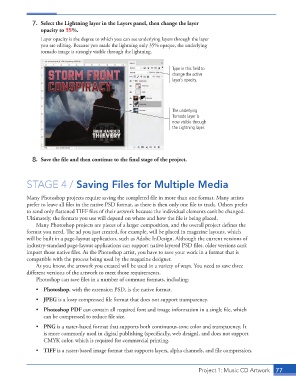
7.  Select the Lightning layer in the Layers panel, then change the layer
                      opacity to 35%.
                      Layer opacity is the degree to which you can see underlying layers through the layer
                      you are editing. Because you made the lightning only 35% opaque, the underlying
                      tornado image is strongly visible through the lightning.


                                                                        Type in this field to
                                                                        change the active
                                                                        layer’s opacity.


                                                                        The underlying
                                                                        Tornado layer is
                                                                        now visible through
                                                                        the Lightning layer.


                   8.  Save the file and then continue to the final stage of the project.


                 STAGE 4 / Saving Files for Multiple Media


                 Many Photoshop projects require saving the completed file in more than one format. Many artists
                 prefer to leave all files in the native PSD format, as there is then only one file to track. Others prefer
                 to send only flattened TIFF files of their artwork because the individual elements can’t be changed.
                 Ultimately, the formats you use will depend on where and how the file is being placed.
                    Many Photoshop projects are pieces of a larger composition, and the overall project defines the
                 format you need. The ad you just created, for example, will be placed in magazine layouts, which
                 will be built in a page-layout application, such as Adobe InDesign. Although the current versions of
                 industry-standard page-layout applications can support native layered PSD files, older versions can’t
                 import those native files. As the Photoshop artist, you have to save your work in a format that is
                 compatible with the process being used by the magazine designer.
                    As you know, the artwork you created will be used in a variety of ways. You need to save three
                 different versions of the artwork to meet those requirements.
                    Photoshop can save files in a number of common formats, including:

                    •  Photoshop, with the extension PSD, is the native format.
                    •  JPEG is a lossy compressed file format that does not support transparency.
                    •  Photoshop PDF can contain all required font and image information in a single file, which
                       can be compressed to reduce file size.
                    •  PNG is a raster-based format that supports both continuous-tone color and transparency. It
                       is more commonly used in digital publishing (specifically, web design), and does not support
                       CMYK color, which is required for commercial printing.
                    •  TIFF is a raster-based image format that supports layers, alpha channels, and file compression.


                                                                                  Project 1: Music CD Artwork   77

