


Page 66 - CC2019_PS_Look_Inside
P. 66
Save a Flattened  TIFF File

              Th  e TIFF format is commonly used for print applications. Although the format
              can include layers, many designers prefer to send fl attened fi les for output to avoid
              any potential problems that might be caused by older output devices, which is still
              an issue, as many service providers do not update very expensive output equipment
              until it becomes absolutely necessary.
                 In this exercise you will save the fi nished artwork as a fl attened TIFF fi le that can
              be used for the album cover sleeve, as well as for most print advertising requirements.

               1. With cd-artwork.psd open, choose File>Save As.
                   Th  e CD artwork is complete in the native Photoshop fi le. In the next few exercises
                   you are going to make changes that you don’t want to become a permanent part of
                   the fi le. Saving it now, if you haven’t already, means the fi nished artwork fi le won’t be
                   compromised in the following exercises.

               2.  If necessary, navigate to your WIP>Music folder as the target location.
                   Th  e Save As dialog box defaults to the last-used location. If you continued the entire
                   way through this project without stopping, you won’t have to navigate.

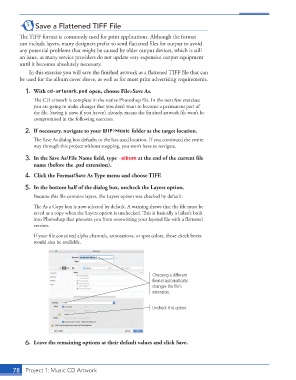
               3.  In the Save As/File Name fi eld, type -album at the end of the current fi le
                   name (before the .psd extension).
               4.  Click the Format/Save As Type menu and choose TIFF.

               5.  In the bottom half of the dialog box, uncheck the Layers option.
                   Because this fi le contains layers, the Layers option was checked by default.

                   Th  e  As a Copy box is now selected by default. A warning shows that the fi le must be
                   saved as a copy when the Layers option is unchecked. Th  is is basically a failsafe built
                   into Photoshop that prevents you from overwriting your layered fi le with a fl attened
                   version.

                   If your fi le contained alpha channels, annotations, or spot colors, those check boxes
                   would also be available.


                                                                 Choosing a different
                                                                 format automatically
                                                                 changes the file’s
                                                                 extension.


                                                                 Uncheck this option.


               6.  Leave the remaining options at their default values and click Save.


           78     Project 1: Music CD Artwork

