


Page 63 - CC2019_PS_Look_Inside
P. 63
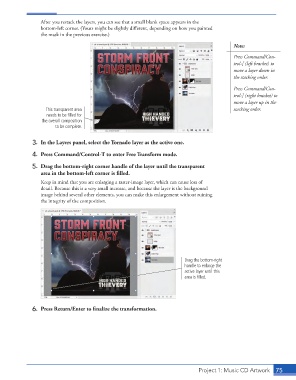
After you restack the layers, you can see that a small blank space appears in the
                      bottom-left corner. (Yours might be slightly different, depending on how you painted
                      the mask in the previous exercise.)

                                                                                                Note:
                                                                                                Press Command/Con-
                                                                                                trol-[ (left bracket) to
                                                                                                move a layer down in
                                                                                                the stacking order.

                                                                                                Press Command/Con-
                                                                                                trol-] (right bracket) to
                                                                                                move a layer up in the
                        This transparent area                                                   stacking order.
                        needs to be filled for
                      the overall composition
                            to be complete.

                   3.  In the Layers panel, select the Tornado layer as the active one.

                   4.  Press Command/Control-T to enter Free Transform mode.

                   5.  Drag the bottom-right corner handle of the layer until the transparent
                      area in the bottom-left corner is filled.
                      Keep in mind that you are enlarging a raster-image layer, which can cause loss of
                      detail. Because this is a very small increase, and because the layer is the background
                      image behind several other elements, you can make this enlargement without ruining
                      the integrity of the composition.


                                                                             Drag the bottom-right
                                                                             handle to enlarge the
                                                                             active layer until this
                                                                             area is filled.


                   6.  Press Return/Enter to finalize the transformation.


                                                                                  Project 1: Music CD Artwork   75

