


Page 69 - CC2019_PS_Look_Inside
P. 69
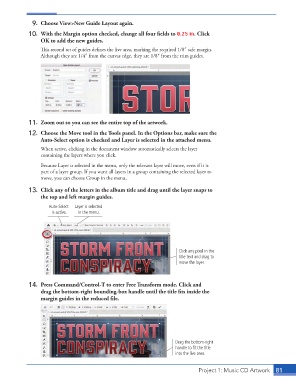
9.  Choose View>New Guide Layout again.

                  10.  With the Margin option checked, change all four fi elds to 0.25 in. Click
                      OK to add the new guides.
                      Th  is second set of guides defi nes the live area, marking the required 1/8″ safe margin.
                      Although they are 1/4″ from the canvas edge, they are 1/8″ from the trim guides.


                  11.  Zoom out so you can see the entire top of the artwork.
                  12.  Choose the  Move tool in the Tools panel. In the Options bar, make sure the
                      Auto-Select option is checked and Layer is selected in the attached menu.
                      When active, clicking in the document window automatically selects the layer
                      containing the layers where you click.
                      Because Layer is selected in the menu, only the relevant layer will move, even if it is
                      part of a layer group. If you want all layers in a group containing the selected layer to
                      move, you can choose Group in the menu.

                  13.  Click any of the letters in the album title and drag until the layer snaps to
                      the top and left margin guides.
                         Auto-Select   Layer is selected
                          is active.  in the menu.


                                                                           Click any pixel in the
                                                                           title text and drag to
                                                                           move the layer.


                  14.  Press Command/Control-T to enter  Free Transform mode. Click and
                      drag the bottom-right bounding-box handle until the title fi ts inside the
                      margin guides in the reduced fi le.


                                                                          Drag the bottom-right
                                                                          handle to fit the title
                                                                          into the live area.


                                                                                    Project 1: Music CD Artwork  81

