


Page 56 - CC2019_PS_Look_Inside
P. 56
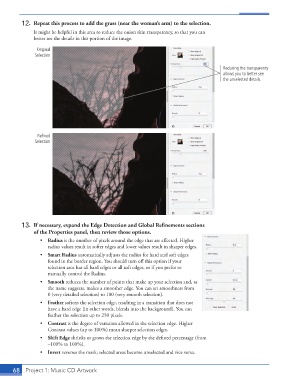
12.  Repeat this process to add the grass (near the woman’s arm) to the selection.
                   It might be helpful in this area to reduce the onion skin transparency, so that you can
                   better see the details in this portion of the image.
                     Original
                    Selection

                                                                                            Reducing the transparency
                                                                                            allows you to better see
                                                                                            the unselected details.


                     Refined
                    Selection


               13.  If necessary, expand the Edge Detection and Global Refinements sections
                   of the Properties panel, then review those options.
                      •  Radius is the number of pixels around the edge that are affected. Higher
                         radius values result in softer edges and lower values result in sharper edges.
                      •  Smart Radius automatically adjusts the radius for hard and soft edges
                         found in the border region. You should turn off this option if your
                         selection area has all hard edges or all soft edges, or if you prefer to
                         manually control the Radius.
                      •  Smooth reduces the number of points that make up your selection and, as
                         the name suggests, makes a smoother edge. You can set smoothness from
                         0 (very detailed selection) to 100 (very smooth selection).
                      •  Feather softens the selection edge, resulting in a transition that does not
                         have a hard edge (in other words, blends into the background). You can
                         feather the selection up to 250 pixels.
                      •  Contrast is the degree of variation allowed in the selection edge. Higher
                         Contrast values (up to 100%) mean sharper selection edges.
                      •  Shift Edge shrinks or grows the selection edge by the defined percentage (from
                         –100% to 100%).
                      •  Invert reverses the mask; selected areas become unselected and vice versa.


           68   Project 1: Music CD Artwork

