


Page 54 - CC2019_PS_Look_Inside
P. 54
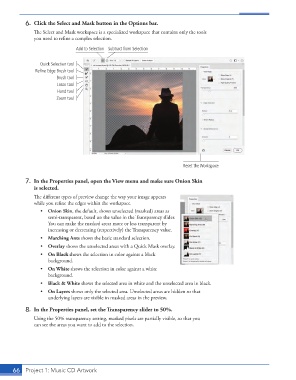
6.  Click the Select and Mask button in the Options bar.
                   The Select and Mask workspace is a specialized workspace that contains only the tools
                   you need to refine a complex selection.
                                    Add to Selection Subtract from Selection


                      Quick Selection tool
                    Refine Edge Brush tool
                            Brush tool
                            Lasso tool
                            Hand tool
                            Zoom tool


                                                                            Reset the Workspace


                7.  In the Properties panel, open the View menu and make sure Onion Skin
                   is selected.

                   The different types of preview change the way your image appears
                   while you refine the edges within the workspace.
                      •  Onion Skin, the default, shows unselected (masked) areas as
                         semi-transparent, based on the value in the Transparency slider.
                         You can make the masked areas more or less transparent by
                         increasing or decreasing (respectively) the Transparency value.
                      •  Marching Ants shows the basic standard selection.
                      •  Overlay shows the unselected areas with a Quick Mask overlay.
                      •  On Black shows the selection in color against a black
                         background.
                      •  On White shows the selection in color against a white
                         background.
                      •  Black & White shows the selected area in white and the unselected area in black.
                      •  On Layers shows only the selected area. Unselected areas are hidden so that
                         underlying layers are visible in masked areas in the preview.
                8.  In the Properties panel, set the Transparency slider to 50%.

                   Using the 50% transparency setting, masked pixels are partially visible, so that you
                   can see the areas you want to add to the selection.


           66   Project 1: Music CD Artwork

